

Nikola Brežnjak blog - Tackling software development with a dose of humor
  • Home
  • About me
Home
About me
  • Nikola Brežnjak blog
  • Home
  • About me
Stack Overflow

Wait for click before starting the game in Phaser

profile for Nikola at Stack Overflow, Q&A for professional and enthusiast programmers
I’m a big fan of Stack Overflow and I tend to contribute regularly (am currently in the top 0.X%). In this category (stackoverflow) of posts I will will be posting my top rated questions and answers. This, btw, is allowed as explained in the meta thread here.

My question was:

The JSFiddle demo is here, but am pasting the code below also. My question is simple (though I can’t seem to find any example in how to realize this): right now if you start the game in JSFiddle you will see that the rectangle immediately “falls” down. I would somehow like the game to start when I click with the mouse (basically that nothing happens before the first click of a mouse) – any points on how to accomplish this?

JS:

// Initialize Phaser, and creates a 400x490px game
var game = new Phaser.Game(400, 490, Phaser.AUTO, 'game_div');
var game_state = {};


// Creates a new 'main' state that wil contain the game
game_state.main = function () {};
game_state.main.prototype = {

    preload: function () {
        // Change the background color of the game
        this.game.stage.backgroundColor = '#71c5cf';

        // Load the bird sprite
        this.game.load.image('bird', 'https://lh6.googleusercontent.com/Xrz0PnR6Ezg5_k5zyFKxGv0LzehAP9SMj_ga3qQzIF4JAfv8xHm7TxfliwtBD8ihfw=s190');
        this.game.load.image('pipe', 'https://lh4.googleusercontent.com/RSMNhJ3KY4Xl0PQpUf6I9EayOdLhvOKKV9QV7_BXXYVedPy0oMNRFKANW14xV76NDA=s190');
    },

    create: function () {
        // Display the bird on the screen
        this.bird = this.game.add.sprite(100, 245, 'bird');

        // Add gravity to the bird to make it fall
        this.bird.body.gravity.y = 1000;

        // Call the 'jump' function when the spacekey is hit
        var space_key = this.game.input.keyboard.addKey(Phaser.Keyboard.SPACEBAR);
        space_key.onDown.add(this.jump, this);

        this.pipes = game.add.group();
        this.pipes.createMultiple(20, 'pipe');
        this.timer = this.game.time.events.loop(1500, this.add_row_of_pipes, this);

        this.score = 0;
        var style = {
            font: "30px Arial",
            fill: "#ffffff"
        };
        this.label_score = this.game.add.text(20, 20, "0", style);

    },

    update: function () {
        // If the bird is out of the world (too high or too low), call the 'restart_game' function
        this.game.physics.overlap(this.bird, this.pipes, this.restart_game, null, this);
        if (this.bird.inWorld == false) this.restart_game();
    },


    // Make the bird jump 
    jump: function () {
        // Add a vertical velocity to the bird
        this.bird.body.velocity.y = -350;
    },

    // Restart the game
    restart_game: function () {
        // Start the 'main' state, which restarts the game
        this.game.time.events.remove(this.timer);
        this.game.state.start('main');
    },

    add_one_pipe: function (x, y) {
        // Get the first dead pipe of our group
        var pipe = this.pipes.getFirstDead();

        // Set the new position of the pipe
        pipe.reset(x, y);

        // Add velocity to the pipe to make it move left
        pipe.body.velocity.x = -200;

        // Kill the pipe when it's no longer visible 
        pipe.outOfBoundsKill = true;
    },
    add_row_of_pipes: function () {
        this.score += 1;
        this.label_score.content = this.score;
        var hole = Math.floor(Math.random() * 5) + 1;

        for (var i = 0; i < 8; i++)
        if (i != hole && i != hole + 1) this.add_one_pipe(400, i * 60 + 10);
    },
};


// Add and start the 'main' state to start the game
game.state.add('main', game_state.main);
game.state.start('main');
CSS:

#game_div {
    width: 400px;
    margin: auto;
    margin-top: 50px;
}

HTML:

<div id="game_div"></div>

I found the answer to this one myself:

So, to not leave this question unanswered and to help further readers, here is the link to the updated jsFiddle where I solved my initial problem, and below is the code from jsFiddle.

However, if one will be interested I suggest taking a look at the freely available code on GitHub which uses game states and has a better structured code.

jsFiddle

CSS:

#game_div {
    width: 400px;
    margin: auto;
    margin-top: 50px;
}

HTML:

<div id="game_div"></div>

JS:

// Initialize Phaser, and creates a 400x490px game
var game = new Phaser.Game(400, 490, Phaser.AUTO, 'game_div');
var game_state = {};
var gameStarted = false;


// Creates a new 'main' state that wil contain the game
game_state.main = function () {};
game_state.main.prototype = {

    game_start: function(){
        if (!gameStarted){
            this.bird.body.gravity.y = 1000;
            this.timer = this.game.time.events.loop(1500, this.add_row_of_pipes, this);
            this.label_start.content = "";
        }
        gameStarted = true;
    },
    preload: function () {
        // Change the background color of the game
        this.game.stage.backgroundColor = '#71c5cf';

        // Load the bird sprite
        this.game.load.image('bird', 'https://lh6.googleusercontent.com/Xrz0PnR6Ezg5_k5zyFKxGv0LzehAP9SMj_ga3qQzIF4JAfv8xHm7TxfliwtBD8ihfw=s190');
        this.game.load.image('pipe', 'https://lh4.googleusercontent.com/RSMNhJ3KY4Xl0PQpUf6I9EayOdLhvOKKV9QV7_BXXYVedPy0oMNRFKANW14xV76NDA=s190');
    },

    create: function () {
        // Display the bird on the screen
        this.bird = this.game.add.sprite(100, 245, 'bird');

        // Add gravity to the bird to make it fall


        // Call the 'jump' function when the spacekey is hit
        this.game.input.onDown.add(this.game_start, this);

        this.pipes = game.add.group();
        this.pipes.createMultiple(20, 'pipe');


        this.score = 0;
        var style = {
            font: "30px Arial",
            fill: "#ffffff"
        };
        this.label_score = this.game.add.text(20, 20, "0", style);
        this.label_start = this.game.add.text(35, 180, "Click to start the show", style);
        game.input.onDown.add(this.jump, this);
    },

    update: function () {
        // If the bird is out of the world (too high or too low), call the 'restart_game' function
        this.game.physics.overlap(this.bird, this.pipes, this.restart_game, null, this);
        if (this.bird.inWorld == false) this.restart_game();
    },


    // Make the bird jump 
    jump: function () {
        // Add a vertical velocity to the bird
        this.bird.body.velocity.y = -350;
    },

    // Restart the game
    restart_game: function () {
        // Start the 'main' state, which restarts the game
        this.game.time.events.remove(this.timer);
        this.game.state.start('main');
        gameStarted=false;
    },

    add_one_pipe: function (x, y) {
        // Get the first dead pipe of our group
        var pipe = this.pipes.getFirstDead();

        // Set the new position of the pipe
        pipe.reset(x, y);

        // Add velocity to the pipe to make it move left
        pipe.body.velocity.x = -200;

        // Kill the pipe when it's no longer visible 
        pipe.outOfBoundsKill = true;
    },
    add_row_of_pipes: function () {
        this.score += 1;
        this.label_score.content = this.score;
        var hole = Math.floor(Math.random() * 5) + 1;

        for (var i = 0; i < 8; i++)
        if (i != hole && i != hole + 1) this.add_one_pipe(400, i * 60 + 10);
    },
};


// Add and start the 'main' state to start the game
game.state.add('main', game_state.main);
game.state.start('main');
 

Angular

Speeding up Angular development with Yeoman

Yeoman helps you to kickstart new projects, prescribing best practices and tools to help you stay productive.

To do so, we provide a generator ecosystem. A generator is basically a plugin that can be run with the `yo` command to scaffold complete projects or useful parts…

First, install Yeoman with npm:

npm install yo -g

Now you need a “generator”, and most likely you’ll need grunt:

npm install -g generator-angular grunt

If you get the error like The package generator-karma does not satisfy its siblings’ peerDependencies requirements then try uninstalling generator-karma:

npm uninstall -g generator-karma

and running the previous npm install command again.

Btw,  you can use Yeoman’s CLI (by first executing yo) to search and install any of the existing generators.

To scaffold a new app, create some folder and execute the following command:

yo angular myApp

Yeoman will ask you few questions to which you can all give a default answer and it will start the installation process. After the installation is done you can do:

grunt serve

to actually see a live preview of your scaffolded app.

If you get an error like Warning: Couldn’t find the `compass` binary. Make sure it’s installed and in your $PATH Use –force to continue install it with (if you’re on Mac):

sudo gem install compass

Additional cool thing is that this generator comes with extra tools for quick scaffolding of routes, controllers, views, directives, services, filters… Be sure to check the project on GitHub for more info.

For example, the following command generates a controller and a view, and configures a route in app/scripts/app.js connecting them.

yo angular:route myroute


Stack Overflow

How can I make sure that DELETE SQL statement in Postgres using PHP was successfull?

profile for Nikola at Stack Overflow, Q&A for professional and enthusiast programmers
I’m a big fan of Stack Overflow and I tend to contribute regularly (am currently in the top 0.X%). In this category (stackoverflow) of posts I will will be posting my top rated questions and answers. This, btw, is allowed as explained in the meta thread here.

My question was:

Is there a function which would return true of false based on if the DELETE SQL statement succeded or not? For example something like this:

<?php
    $sql = "DELETE FROM table WHERE id=123";
    $result = pg_query($sql);

    if **function**($result)
        return true;
    else
        return false;
?>

The answer, by LolCoder, was:

Use mysql_affected_rows() to get number of affected rows in mysql.

Similary for postgres, it will be pg_affected_rows.

NodeJS, Quick tips

Keep your Node.js scripts running with Forever and Nodemon

edit (18.06.2015): Nowdays I’m using PM2, and here’s my post that explains how to use PM2.


Nodemon is a utility that will monitor for any changes in your source and automatically restart your server.  Install with npm:

npm install -g nodemon

Forever is a simple CLI tool for ensuring that a given script runs continuously (i.e. forever). Install with npm:

npm install -g forever

Forever & Nodemon running together:

forever start nodemon --exitcrash app.js

edit (24.02.2015):

If you get an error like this:

error:   Cannot start forever
error:   script /home/nikola/nodemon does not exist.

Try to run nodemon with the full path:

forever start /usr/bin/nodemon --exitcrash app.js

You can find out the path to nodemon by executing:

which nodemon
Stack Overflow

Writing small data to file and reading from it or query the database

profile for Nikola at Stack Overflow, Q&A for professional and enthusiast programmers
I’m a big fan of Stack Overflow and I tend to contribute regularly (am currently in the top 0.X%). In this category (stackoverflow) of posts I will will be posting my top rated questions and answers. This, btw, is allowed as explained in the meta thread here.

My question was:

I have a situation where I would have to query the database for some data which is the same for all users and changes daily, so I figured I could make a file in which I would save this data (once per day) and then load it from that file each time a user visits my site.

Now, I know that this is a common practice (caching) when the requests from database are big but the data I’m about to write to the file is a simple 3 digit number, so my question is should this still be faster or is it just an overkill and I should stick with the database query?

 The answer, by Dukeling, was:

Caching, when done right, is always faster.

It depends how long storing and retrieving data from the file takes and how long requests to the database takes.

If the database query to get the number takes long, then caching may be a good idea, since the data is small.

If you were to do a search (e.g. sequential) in a file with lots of cached data (which doesn’t seem to be the case), it would take long.

Disk I/O could be slower than database I/O (which is unlikely, unless it’s a local DB).

Bottom line – benchmark.

For your scenario, caching is probably a good idea, but if it’s only a single 3-digit number for all users then I’d just try to stick it in RAM rather than in a file.

NodeJS

How to use Redis with Node.js

Redis is an open source, BSD licensed, advanced key-value cache and store. It is often referred to as a data structure server since keys can contain strings, hashes, lists, sets, sorted sets, bitmaps and hyperloglogs.

Comparison with Memcache and Memcached can be found here, and the naming distinction can be found here.

You can download the installation zip file here (I used the Windows version), and extract it to C:\redis. To run the Redis server (in order to be able to save to it and query it) you have to execute the redis-server.exe from this directory.

To use Redis with Node.js you have install the redis module:

npm install redis

A simple usage example:

var redis = require("redis"),
    client = redis.createClient();

// if you'd like to select database 3, instead of 0 (default), call
// client.select(3, function() { /* ... */ });

client.on("error", function (err) {
    console.log("Error " + err);
});

client.set("string key", "string val", redis.print);
client.hset("hash key", "hashtest 1", "some value", redis.print);
client.hset(["hash key", "hashtest 2", "some other value"], redis.print);
client.hkeys("hash key", function (err, replies) {
    console.log(replies.length + " replies:");
    replies.forEach(function (reply, i) {
        console.log("    " + i + ": " + reply);
    });
    client.quit();
});

A lot more examples here.

Unity3D

Sharing data between scenes in Unity3D

Here’s I’m going to show you steps on how to share your data between scenes in Unity3D

  1. In the starting scene make a new empty object and name it GameData.
  2. Add a script named GameController with the following content:
    #pragma strict
    
    private var data : Array;
    
    function Awake () {
    	DontDestroyOnLoad (this);
    }
    
    function Start () {
    	data = new Array();
    	
    	GetNewResults();
    }
    
    function GetNewResults(){
    	var www : WWW = new WWW ("http://localhost/check");
    	
    	yield www;// Wait for download to complete
    	
    	var dataJson = JSON.Parse(www.data);
    	var novi = dataJson["data"].Value;
    	data = dataJson["someMoreData"];
    	
    	if (novi == "true"){	
    		Application.LoadLevel(Application.loadedLevel + 1);
    	}
    	else{
    		Debug.Log("false");
    	}
    }
    
    public function getData(){
    	return data;
    }

    The most important part is DontDestroyOnLoad(this) which does not destroy this object once a new scene is loaded.

  3. Then, in another scene, in some script do the following to fetch the data:
    var data = GameObject.Find("GameData").GetComponent(GameController).getData();


Ionic

Create icons and splash screen automatically with ionic resources

In Ionic framework you can use the

ionic resources

command to automatically generate icons and splash screen of different sizes and for optionally different platforms (iOS, Android).

All you have to do is place the icon.png and splash.png in the resources folder in the root of the application and execute the aforementioned command. Ionic will generate the needed configuration in the config.xml file. More about it on the official blog post.

CodeProject, Unity3D

Quick tip on how to use custom fonts in Unity3D

In this post I’m going to show you how to use custom fonts in Unity3D.

TimerTime

demo  forkMe

  1. Create a new project
  2. Save scene (CTRL + s) and name it whatever you wish
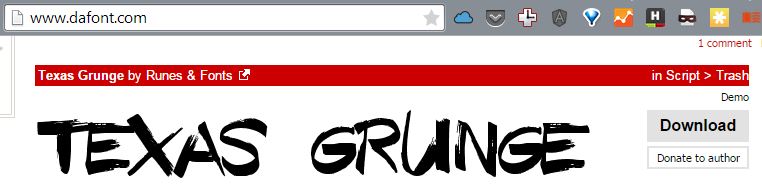
  3. Download some free font from the web (I used Texas Grunge from dafont.com):
    FontImportUnity
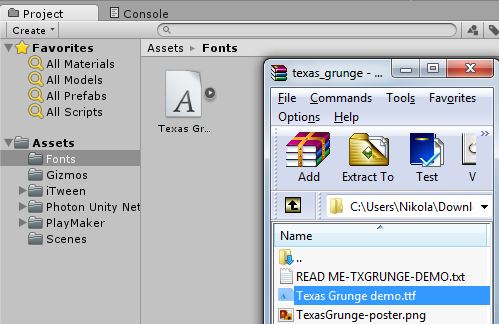
  4. Create a new folder called Fonts in the Assets folder and drag the .ttf  file inside
    FontImportUnity_2
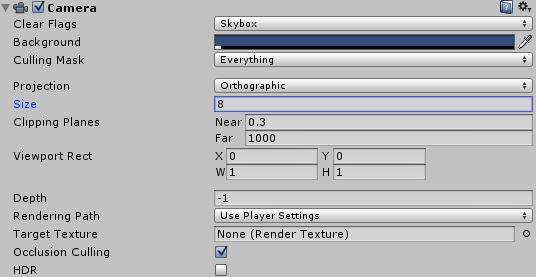
  5. Adjust the size of the Camera to 8:
    CameraSize
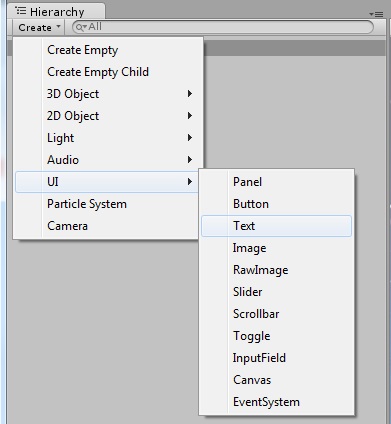
  6. Hierarchy->Create->UI->TextAddingText
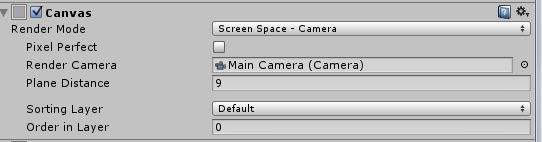
  7. Click on Canvas in Hierarchy and set the Render Mode and select your Render Camera:CanvasRenderMode
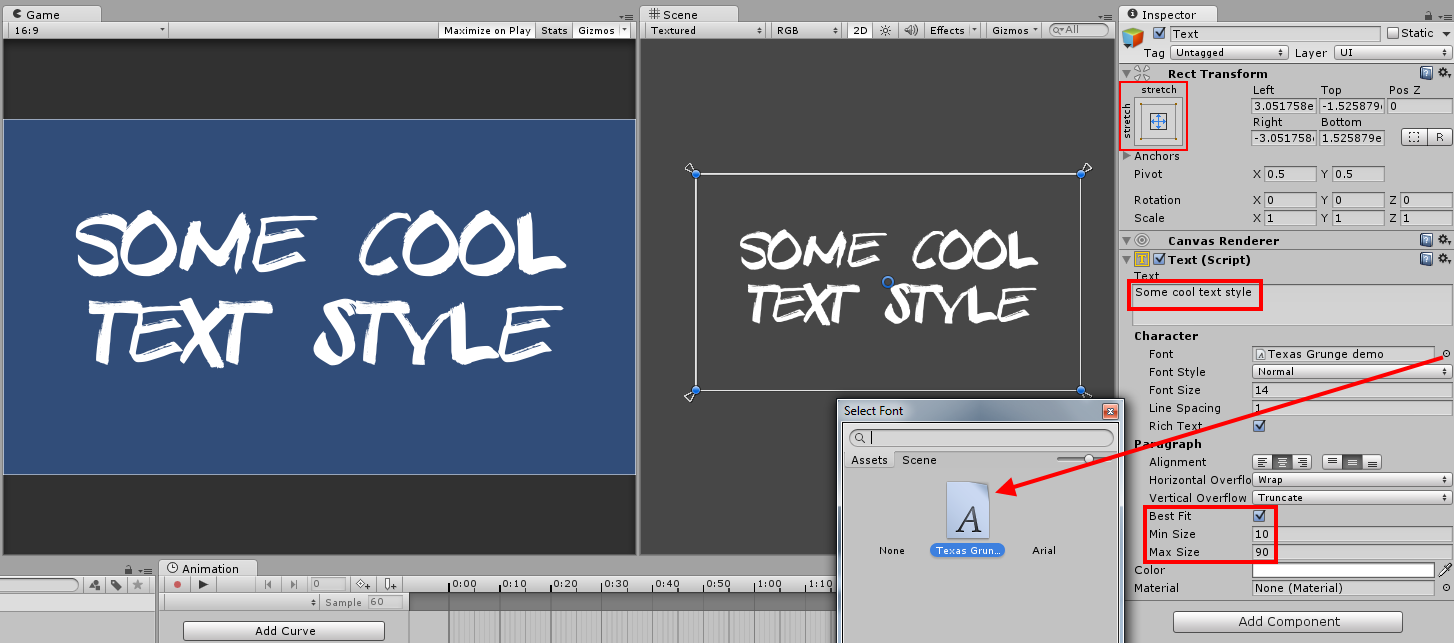
  8. Click on Text and change the settings (Rect Transform – resize the text to match the canvas size and drag the anchors in all 4 corners, Text, Font, Best Fit, Max Size):
    FontImportUnity_4
Stack Overflow

When I click the next page in datatables my jquery selectors aren’t working anymore

profile for Nikola at Stack Overflow, Q&A for professional and enthusiast programmers
I’m a big fan of Stack Overflow and I tend to contribute regularly (am currently in the top 0.X%). In this category (stackoverflow) of posts I will will be posting my top rated questions and answers. This, btw, is allowed as explained in the meta thread here.

My question was:

I’m using datatables plugin for jquery to show my data on the page. I have this selector when someone clicks on a row:

$('#myTable tr[class !="tableHeader"]').click(function(){
    alert("clicked!");
}

and everything is OK until I click on the “Next page” which shows me next 10 results – then this click function doesn’t show “clicked” message box anymore no matter which row I click.

I’m guessing that the problem is in a way how these new results (rows in the table) are shown, so please give me some ideas on how to solve this.

 The answer, by ghayes, was:

Use jQuery’s Live function. Live will apply to all elements on the page, even ones that don’t exist yet (I assume this is your issue). Thus, your new rows will be clickable when they are created and added to the DOM.

$('#myTable tr[class !="tableHeader"]').live('click',function(){
  alert("clicked!");
});
Page 42 of 54« First...102030«41424344»50...Last »

Recent posts

  • FOMO as a Developer: You’re Not Behind, You’re Just Human
  • If only life had an XP bar
  • Are Book Summaries Worth It?
  • Book review: 5 Love Languages
  • Why You Should Start Blogging (Even If Nobody Will Read It)

Categories

  • Android (3)
  • Books (115)
    • Programming (22)
  • CodeProject (36)
  • Daily Thoughts (78)
  • DevThink (8)
  • Go (3)
  • iOS (5)
  • JavaScript (128)
    • Angular (4)
    • Angular 2 (3)
    • Ionic (61)
    • Ionic2 (2)
    • Ionic3 (8)
    • MEAN (3)
    • NodeJS (27)
    • Phaser (1)
    • React (1)
    • Three.js (1)
    • Vue.js (3)
  • Leadership (1)
  • Meetups (8)
  • Miscellaneou$ (84)
    • Breaking News (8)
    • CodeSchool (2)
    • Hacker Games (3)
    • Pluralsight (7)
    • Projects (2)
    • Sublime Text (2)
  • PHP (6)
  • Quick tips (44)
  • Servers (8)
    • Heroku (1)
    • Linux (3)
  • Stack Overflow (82)
  • Unity3D (9)
  • VibeCoding (2)
  • Windows (8)
    • C# (2)
    • WPF (3)
  • Wordpress (2)

"There's no short-term solution for a long-term result." ~ Greg Plitt

"Everything around you that you call life was made up by people that were no smarter than you." ~ S. Jobs

"Hard work beats talent when talent doesn't work hard." ~ Tim Notke

© since 2016 - Nikola Brežnjak