
Nikola Brežnjak blog - Tackling software development with a dose of humor
  • Home
  • About me
Home
About me
  • Nikola Brežnjak blog
  • Home
  • About me
Miscellaneou$

Ekobit DevArena X 2015

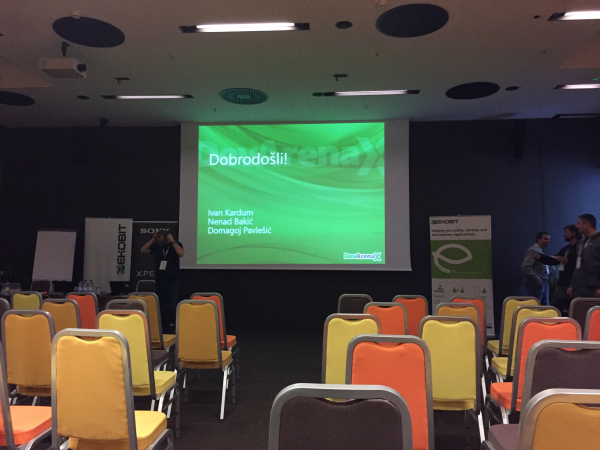
I just came home from the ever so slightly awesome Ekobit DevArena X conference. As I usually do, I’ll share my notes that I took in my notebook and a few pictures.

Start your engines

Well, you can’t start a day on an empty stomach, right?

IMG_5014

This is how the accreditation looked like:

IMG_5015

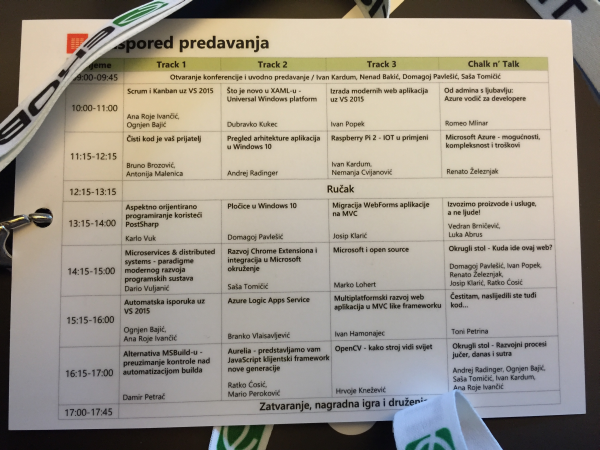
The accreditation had a handy list of all the presentations on the back side:
IMG_5016

As you can see, there were 4 tracks between which you could choose (yes, you could go to any presentation in any of the tracks in a certain timeslot). Chalk n’ Talk presentations are actually a cool thing where they aren’t actual presentations rather something like a round table where the presenter(s) discuss their real life experiences (and the input from the crowd is also highly desirable).

Keynote

  • Presenters: Ivan Kardum, Nenad Bakić, Domagoj Pavlešić and Saša Tomičić
  • 10th in a row Ekobit DevArenaIMG_5017
  • A very interesting project called Croatian Makers by Nenad Bakić who was very inspiring and kudos for starting all this
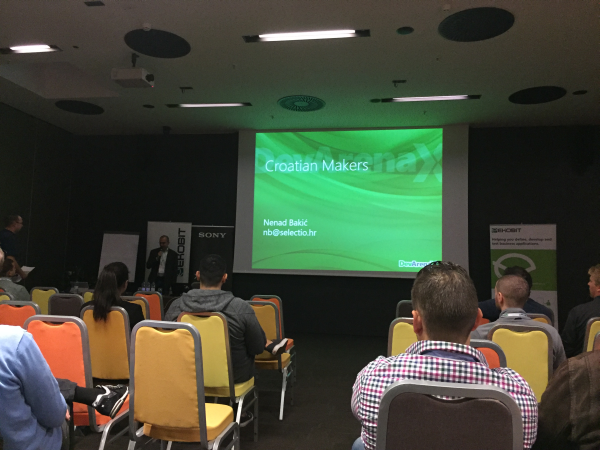
    IMG_5018
  • They donated robotical equipment to over 50 schools in Croatia
  • Serwantes
  • Fantom 3
  • Lego Mindstorms – can’t wait to get this for my little girl! Yeah, I know it’s an excuse for me to play with it too 🙂
  • He shared a quite intriguing image with us:
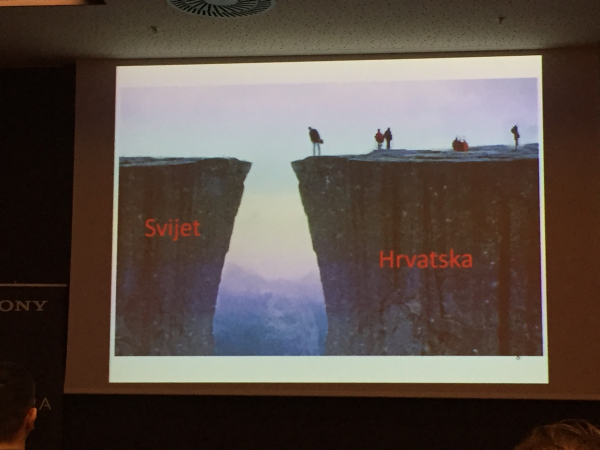
    IMG_5019

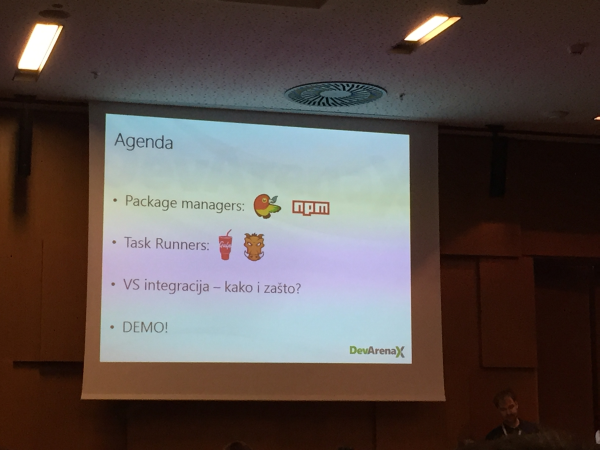
Modern web application development in Visual Studio 2015

  • Presenter: Ivan Popek
  • IMG_5022
  • IMG_5023
  • Bower and npm come preinstalled with Visual Studio 2015. I wrote a detailed tutorial for Digital Ocean about Bower if you want to take a look.
  • Gulp and Grunt are task runners which offer tools like minification, concatenation, linting, etc…
  • Personally, I like Gulp better because of it’s clearer syntax
  • Gulp is faster because it uses streams
  • Git and Node are also preinstalled by default on VS 2015
  • The way you “add” packages for Bower is that you create a bower.json file in the Solution explorer and as soon as you hit Save it installs the listed dependencies. It creates the Dependencies folder and a bower_components folder
  • bower install runns automatically after you open up the project
  • To add Gulp create a package.json file in the Solution explorer and as soon as you hit Save npm will install it. You can add additional Gulp dependencies the same way.
  • To start writing Gulp tasks, create a gulpfile.js and hack on 🙂
  • Visual Studio 2015 has a nice TaskRunner explorer where you can run the tasks manually. However, it’s way better to set a “watch” task inside Gulp so that it runs the tasks automatically for you. For example, if you’re using SASS it will compile to CSS automatically on every change to the SASS files. You can set the watch tasks to run after you reoppen the project with Watch -> Bindings->Project open

Clean code is your friend

  • Presenters: Bruno Brozović and Antonija Malenica

    IMG_5024
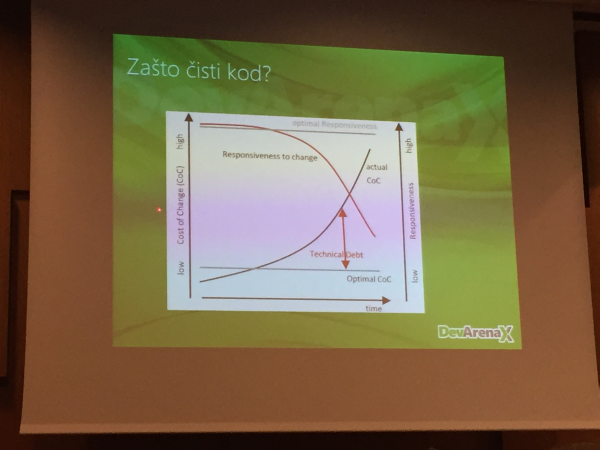
  • Technical debt
  • Writing code : Reading code = 1 : 10 in terms of time. It’s way better to invest time at the beginning to write “clean code” as it will pay of in the later stages of the project
    IMG_5025
  • The boy scout rule – always leave the campground cleaner than you found it
  • YAGNI (You ain’t gonna need it) – do not add functionality until deemed necessary
  • KISS (Keep It Simple Stupid) – Simplicity is better than complexity
  • DRY (Don’t Repeat Yourself) – every piece of knowledge must have single, unambigious, authorative representation within system
  • Principle of least surprise – do the least surprising thing
  • SRP (Single Responsibility Principle) – a class should have only one reason to change
  • Single level of abstraction
  • Methods
    • names – detail and descriptive
    • short
    • number of arguments as small as possible (0, 1, 2)
    • SRP
  • Comments – you should strive to write selfdocumenting code
  • Classes
    • QualitatyClassName (25-30 characters)
    • SRP
    • smaller number of cohesive classes
    • Open Closed Principle – open for extension, closed for modification
  • Learning test
  • And now, a spectacle! In a room of about 100 people when the question “How many of you are using Unit testing?” was asked only 4 people raised their hands 1415131129_smiley-evil

Lunch

smileyGlasses

IMG_5026

We’re outsorcing products and services, not people!

  • Presenters: Luka Abrus (Five Minutes), Vedran Brničević (Ekobit)

    IMG_5027
  • Ekobit started in 1992
    • ALM, BizDataX
  • Five minutes needed 7 years to come to the point where 100% of the things they do is on the USA market
  • Customer feedback by literally going live from door to door and ask
  • Landing pages + AdWords + Sign me up
  • Nobody buys enterprise software without a support
  • Europe’s problem is language barriers from country to country
  • Funny anecdote: when you say to an American that you’re from Croatia: “Oh, yes Dubrovnik – Game of Thrones!”. Also funny one was “oh, you’re just a Russian school of mathematics”. And thus, they believe we are good programmers; designers not so much.
  • You need to be willing to hop the plane and go to a meeting at any time
  • Five Minutes has currently 12 free spots
  • NY Area software developer 150-200$ per hour (jaw-dropping!)
  • Quality is everything!
  • Put your code to GitHub, designs to Dribble, Behance
  • The main problem that both of the presenters expressed was that there are just not enough (quality) developers

Where is this web going?

  • Presenters: Domagoj Pavlešić, Ivan Popek, Renato Železnjak, Josip Klarić, Ratko Ćosić
  • this was a round table like presentation

    IMG_5029
  • Browser as an Operating System
  • Microsoft is slowing down the Web standardization
  • Too many JS frameworks (you don’t say 😉)
  • NO for monolith framework
  • Use linting
  • Gridster, Selectize, Knockout
  • Throw jQuery out
  • TypeScript two thumbs up

Automated delivery in Visual Studio 2015

  • Presenters: Ognjen Bajić and Ana Roje Ivančić

    IMG_5030
  • Build vNext
  • 2015 Intentional Extensibility – open source
  • Custom build workflows
  • Real time output
  • Versioning
  • Cross-platform build (Win, Mac, Linux)
  • Build .NET, Java, Android, iOS
  • Ant, CMake, Maven, Xcode Build, Android Build
  • Agents, Pools, Queues
  • Testing, web performance, load tests

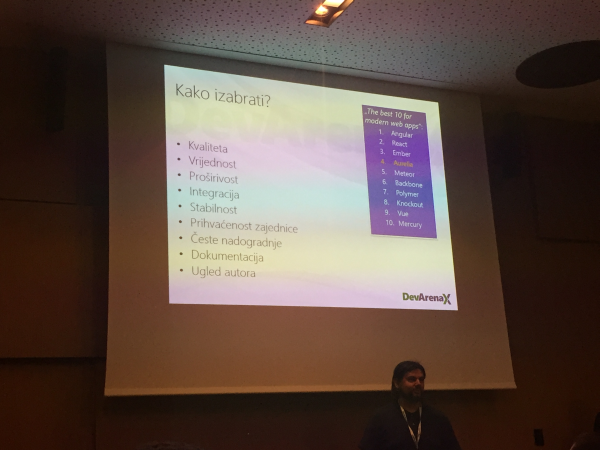
Aurelia – new generation JavaScript framework

  • Presenters: Ratko Ćosić and Mario Peroković
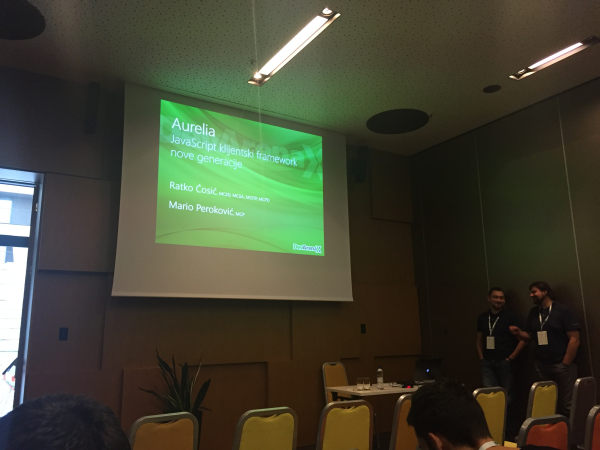
    IMG_5036
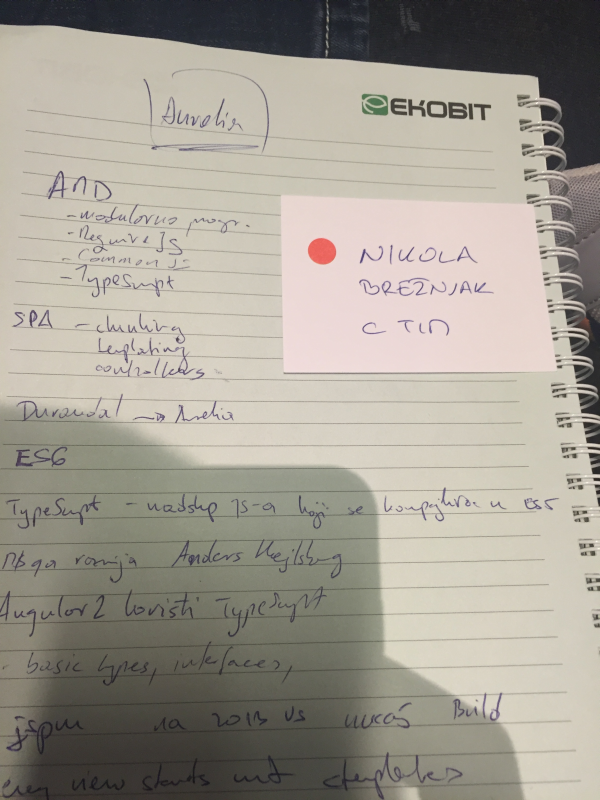
  • AMD
    • modular programming
    • RequireJS
    • CommonJS
    • TypeScript
  • SPA
    • chunking
    • templating
    • controllers
  • Which framework should I choose?
    IMG_5037
  • Durandal -> Aurelia
  • JavaScript is a subset of TypeScript which is compiled in ES5. Microsoft is developing along with Anders Hejlsberg (C# creator)
  • Angular2 uses TypeScript
  •  Every view starts with <template>
  • MVVM – model view view-model
  • DI – dependency injection
  • Parent view models
  • Routing
  • Screen activation lifecycle
  • uses jspm
  • jspm install aurelia-http-client
  • <input type=”text” value.bind=”firstName” /> and then reference it like ${firstName}
  • Debugging
    • compile-spy
    • view-spy

They had a nice additional prize draw for those who asked questions (you get a small paper which you toos in a drawing bowl). I got mine on the last presentation. However, no luck in winning something 🙁
IMG_5039

However, as every year, they are giving prizes for the first few people who sign up for the conference. This year I signed up at 6th place, and because of that I got a nice 2 tickets at Terme Tuhelj, and also a nice hoodie with a number 6 🙂IMG_5047

Thanks and hope to see you next year!

Sublime Text

How to set up live Markdown preview on Windows with Sublime Text and Markmon

If you write on the web, you must have come across the awesome Markdown:

a text-to-HTML conversion tool for web writers. Markdown allows you to write using an easy-to-read, easy-to-write plain text format, then convert it to structurally valid XHTML (or HTML).

You can learn more about it from the official documentation.

There are many editors that allow you to write in Markdown but, as I found, most of them require a license. Besides, wouldn’t it be great that your own editor would have a Markdown support? That’s why I love Sublime Text, it has a plugin for everything. Well, ok, it doesn’t have a plugin to throw out sandwiches from your computer, but I guess it will be able to in the not so distant future. smileyGlasses

Ok, jokes and wishes aside, let see how to set up live Markdown preview on Windows with Sublime Text and Markmon plugin.

Install Markmon:

npm install -g markmon

Install pandoc.

Install Markmon Sublime Text plugin through its Package Control (search for “Markmon”).

Make sure you have markmon and pandoc in your PATH variable.

Run markmon in the folder where is your .md file, like this:

markmon myMDfile.md

open up your browser at localhost:3000.

Write on! hand_rock_n_roll

How to set up live #Markdown preview on #Windows with #Sublime Text and #Markmon http://t.co/ROZZxCbvGb

— Nikola Brežnjak (@HitmanHR) October 18, 2015

Books

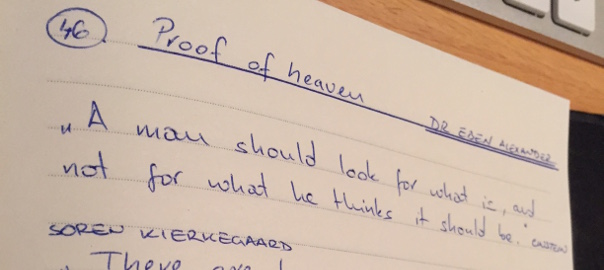
Proof of heaven – Dr. Eben Alexander

My notes from the bestseller book Proof of Heaven: A Neurosurgeon’s Journey into the Afterlife by Dr. Eben Alexander, which I rated  4/5 on my Shelfari account:

A man should look for what is, and not for what he thinks it should be. ~ Albert Einstein

There are two ways to be fooled. One is to believe what isn’t true. The other is to refuse to believe what is true. ~Soren Kierkegaard

If yo would be a real seeker after truth it is necessary that, at least once in your life, you doubt as far as possible all things. ~ Rene Descartes

If tomorrow starts without me – David Romano

https://twitter.com/HitmanHR/status/655834520990687232

Books

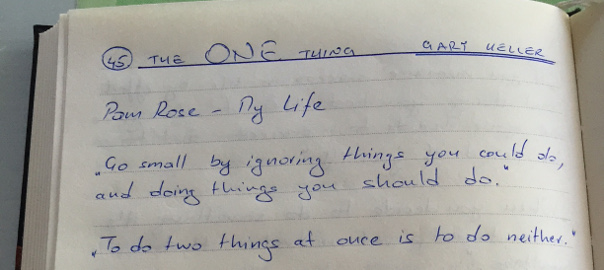
The ONE Thing – Gary Keller

My notes from the bestseller book The ONE Thing by Gary Keller, which I marked as favorite and rated 5/5 on my Shelfari account:

Pam Rose – My life

Go small by ignoring things you could do, and doing things you should do.

To do things at once is to do neither.

Habits are hard to only in the beginning.

Discipline over 66 days equals habit.

Do what mathers most first each morning when your willpower is strongest.

Nothing ever achieved absolute balance. A balanced life is a lie. Time on one thing means time off on another.

When you’re supposed to be working – work. When you’re supposed to be playing – play.

Don’t be afraid to fail! See it as part of your learning process and keep striving for your true potential.

Don’t let small things cut your life down to size. Think big, be bold, aim high and see just how big you can blow up your life.

The key to success is not in all the things that we do, but in the few things that we do well.

Judge a man by his questions, rather than his answers.

Asking questions improves learning and performance by 150%.

What’s the one thing I can do, such that by doing it everything else will be easier or unnecessary?

Writing down your goals makes it 35.9% more likely to accomplish them.

Time block your time off, your one thing, and your planning time.

Nobody whoever gave his best regretted it.

Time on a task overtime eventually beats talent every time.

If the people know how hard I had to work to gain my mastery it wouldn’t seem wonderful at all – Michelangelo

Meditate and pray. Eat right. Exercise. Sleep. Hug. Kiss. Love. Set goals. Plan. Timeblock your one thing.

Hang out with people who seek achievements.

20 years from now you’ll be more disappointed by the things that you didn’t do than by the things you did to do.

https://twitter.com/HitmanHR/status/655731461098729472

NodeJS, Stack Overflow

Why am I getting Unexpected token ‘\u0000’ when using npm install -g package

profile for Nikola at Stack Overflow, Q&A for professional and enthusiast programmers
I’m a big fan of Stack Overflow and I tend to contribute regularly (am currently in the top 0.X%). In this category (stackoverflow) of posts, I will be posting my top rated questions and answers. This, btw, is allowed as explained in the meta thread here.

I answered this question by user user5148540:

This is probably a Windows specific issue but I haven’t found any information when googling this issue. I had been using ionic framework which relies on Cordova (or Phonegap). However, the problem is not specific to any of these packages. I see this error quite often. So, the error is when I run a command such as the following:

npm install -g cordova

However, I could substitute various other packages and get the same error. I’ll paste the snippet (very brief) below of the error message. What is strange is that I had an ionic project working in that directory earlier. Then today it told me that ionic could not be found. My hunch is that this is a different issue than the main issue I am describing here.

I installed git bash so I do have a linux-like environment that I could try. I would just select Git Bash for a bash window with various bash commands. If there is an easier way to fix this for Windows users, please let me know. I have seen courses on Pluralsight where the instructors seem to be happily using npm with no problems. Also, when I use yeoman, I also at some point, in many cases, get the same error.
The error is

npm ERR! Failed to parse json
npm Unexpected token '\u0000' at 1:1
npm ERR!
npm ERR! ^
npm ERR! File: c:\Users\Bruce\AppData\Roaming\npm-cache\amdefine\1.0.0\package\package.json
npm ERR! Failed to parse package.json data.
npm ERR! package.json must be actual JSON, not just JavaScript.
npm ERR!
npm ERR! This is not a bug in npm
npm ERR! Tell the package author to fix their package.json file. JSON.parse.

Thanks in advance for any help/advice, Bruce

My answer was:

 Via this question on SO it could be that you just have to do:

npm cache clean

But, also try the other methods suggested there like adding the registry option:

npm install <packagename> --registry http://registry.npmjs.org/

Or, if you’ve been mingling with the package.json file by yourself, check if it’s valid.

https://twitter.com/HitmanHR/status/655111949139599364

Ionic

Ionic is wordpress for mobile apps

As the official blog post nicely states

mobile just changed forever

How come? Well, as the post says

Google started indexing iOS 9 apps that support the HTTP deep link standards, allowing users to find and open app content through the standard Google search in Safari on iOS and Google on Android.

What this means is that even more businesses will want to have their app. Why? Well, for the same reasons why they created websites. One of our professors at university used to joke:

if it’s not on the web, it doesn’t exist

Anyways, that’s why I think Ionic is going to become the mainstream goto place for making apps, and making them quick.

As the author of that posts says:

Ionic is planning to become WordPress for apps

So, dear fellow developers – it’s time to dive into the app business. And, if you still haven’t got a clue where to start – Ionic is a great place, especially if you have web development skills.

#Ionic is #wordpress for #mobile #apps http://t.co/5E5bhCtaXD

— Nikola Brežnjak (@HitmanHR) October 14, 2015


Ionic

Build an app for distribution with Ionic Package

As just announced on the official blog post IonicPackage now lets you build an iOS app for distribution on Windows machine.

This indeed is a huge news. However, don’t think you won’t have to buy a Mac (or make your own Hackintosh or buy Mac in cloud or similar mumbo jumbo) to build an app for iOS. Well, at least for now you still have to set the certificate and provisioning profile for iOS builds (and you can do that only on a Mac).

Anyways, during the open alpha period, Ionic Package will be 100% free to use, and later they promised to have a free dev package as well.

In order to try this out first update your Ionic CLI to the newest version:

npm install -g ionic

Then, when you’re done with your app, you have to make sure that you uploaded it to Ionic with:

ionic upload

Build for Android

If you want to build for Android it execute:

ionic package build android

The output of the command looks something like this:

> ionic package build android --profile dev                                
[=============================]  100%  0.0s
Preparing your resources...
Uploading your resources to Ionic...
Submitting your app to Ionic Package...
Your app has been successfully submitted to Ionic Package!
Build ID: 1
We are now packaging your app.

To check the status of the packaging execute:

ionic package list

You should see something similar to this output:

> ionic package list                                                       

  id │ status  │ platform │ mode  │ started
─────┼─────────┼──────────┼───────┼────────────────────────
  1  │ SUCCESS │ android  │ debug │ Oct 14th, 2015 21:20:33

Showing 1 of your latest builds.

If the status shows SUCCESS then you can finally download the build by executing:

ionic package download BUILD_ID

Where, of course you would enter your own BUILD_ID number. In my case the command would be:

ionic package download 1

The output of the command shows where the .apk file has been downloaded:

> ionic package download 1                                                 
Downloading... [=============================]  100%  0.0s

Wrote: /Users/nikola/Desktop/ionicTesting/ionicPackageTest/ionicPackageTest.apk
 ✓ Done!

You can learn more about how to use the Ionic Android build tools from official documentation.

Build for iOS

The process is basically the same as for Android, with the added prerequisite of creating certificate and provisioning profile. You can learn more about how to use the Ionic iOS build tools from official documentation.

Build an #app for distribution with #Ionic Package http://t.co/TOfW7ofZXR

— Nikola Brežnjak (@HitmanHR) October 14, 2015

JavaScript, Stack Overflow

How to override a function when creating a new object in the prototypal inheritance?

profile for Nikola at Stack Overflow, Q&A for professional and enthusiast programmers
I’m a big fan of Stack Overflow and I tend to contribute regularly (am currently in the top 0.X%). In this category (stackoverflow) of posts, I will be posting my top rated questions and answers. This, btw, is allowed as explained in the meta thread here.

I asked the following question which turned out to be quite a popular one:

From this blog post we have this example of a prototypal inheritance in JavaScript:

var human = {
    name: '',
    gender: '',
    planetOfBirth: 'Earth',
    sayGender: function () {
        alert(this.name + ' says my gender is ' + this.gender);
    },
    sayPlanet: function () {
        alert(this.name + ' was born on ' + this.planetOfBirth);
    }
};

var male = Object.create(human, {
    gender: {value: 'Male'}
});

var female = Object.create(human, {
    gender: {value: 'Female'}
});

var david = Object.create(male, {
    name: {value: 'David'},
    planetOfBirth: {value: 'Mars'}
});

var jane = Object.create(female, {
    name: {value: 'Jane'}
});

david.sayGender(); // David says my gender is Male
david.sayPlanet(); // David was born on Mars

jane.sayGender(); // Jane says my gender is Female
jane.sayPlanet(); // Jane was born on Earth

Now, what I’m wondering is how does one properly “override”, for example, the sayPlanet function?

I tried it like this:

jane.sayPlanet = function(){
    console.log("something different");
};

and this works.

However, I also tried it like this:

var jane = Object.create(female, {
    name: {value: 'Jane'},

    sayPlanet: function(){
        console.log("something different");
    }
});

but I get a type error.

My questions are:

  • how can I add the sayPlanet function inside the Object.create?
  • is this at all “a good way” or is there a better (best practice) way?

edit: I figured a way how I can add the sayPlanet inside the Object.create:

sayPlanet: {
    value: function(){
        console.log("something different");
    }
}

However, a second question remains. Also, I would appreciate if someone can explain it in a bit deeper level if this is “a good way” to use it like this.

edit #2: As Mahavir pointed below, this is an awful example, because as it turns out you can’t (please correct me if I’m wrong) change the name of jane once it has been Object.created.

edit #3: (man oh man, this is going to get me in a certain facility where people wear white coats). As @WhiteHat pointed below, indeed you can set a name property to be updatable like this:

var jane = Object.create(female, {
    name: {
        value: 'Jane',
        writable: true
    }
});

and then you can do jane.name="Jane v2.0";.

I’ll be honest here people – I do not have a clue as to which direction to take with seemingly so many options. And just today I read Eric Elliot https://medium.com/javascript-scene/the-two-pillars-of-javascript-ee6f3281e7f3 and now I don’t know what to think anymore because he goes on to argue that people at the ES6 aren’t quite doing it right :O. Meh, I guess I’ll have to revisit the Crockfords book yet again, decide on a “one way” and see how far it takes me.


I got quite a few answers, and I also set up a bounty since my question at first didn’t get much attention. Finally the answer by user Julien Grégoire which I accepted was this one:

Using Object.create is certainly a valid approach, but the example itself seems to me a bit misleading regarding the inner workings of Object.create. The blog post does a really good job of summarizing the different ways to create objects in javascript, but I don’t think the example for Object.create gives a good idea of how it works, which is more similar to the new/constructorapproach than it may seem.

Object.create allows to create an object based on a prototype, but without a constructor. This means that the prototype chain of the created object isn’t dependent on a constructor, (which is why it may be simpler to follow, this prototype linked via the constructor is not very straightforward or easy to follow). But Object.create still creates a prototype chain, in the same way new does.

So in your example, when you define name in human for example here:

var human = {
    name: '',

And then when you create jane:

var jane = Object.create(female, {
    name: {value: 'Jane'}

You’re not really assigning a value to the name property you defined in human. You’re in fact adding a property to jane. But human.name still is a property in prototype chain of jane. It works because javascript will follow the prototype chain to find the first matching property, but human.name is still somehow linked to jane.

See here: https://developer.mozilla.org/en-US/docs/Web/JavaScript/Inheritance_and_the_prototype_chain

Same thing happens if you use a constructor:

var Person = function(gender, name) {
     this.name = name;
}

var newPerson = new Person();

And same goes for sayPlanet function.

It’s a valid approach, but can lead to strange behaviors. For example, you could decide to modifiy sayPlanet for all humans by assigning it this way:

human.sayPlanet = function(){console.log('new sayPlanet')}

This would then work for all humans, except the ones for which you have given a sayPlanetproperty of their own. Which in your case may be the expected result. But still, you have to see if sayPlanet really should be a property of human.

With gender, it’s applied in human, and in male and female. So changing human.gender wouldn’t work on any one. But it’s still a property of human, which is a bit confusing when you want to work with these objects. You basically have a property that is defined, that is writable, but that when changed has no effect at all. It’s mainly an indication as to which property you need to add to your humans instances or somewhere in the prototype chain. Again, it seems to be used a lot, but when explained with this kind of examples, it somehow gives the impression that Object.create just combines properties, but it’s not what it does.

In the end, you need to chose if you want to work with prototypes or not. If not, then Functional inheritance is probably the best way. Then each object is different and has its own set of properties, that you can initialize, and you don’t have to worry about prototypes.

If you want to use prototypes, then you can use new/constructor or Object.create approach. But Object.create will create a prototype chain the same way new does, it just gets rid of the constructors.

A small example of how Object.create and new share some behaviors:

var human = {
    name: '',
    gender: '',
    planetOfBirth: 'Earth',
    sayGender: function () {
        console.log(this.name + ' says my gender is ' + this.gender);
    },
    sayPlanet: function () {
        console.log(this.name + ' was born on ' + this.planetOfBirth);
    }
};

var male = Object.create(human, {
    gender: {value: 'Male'}
});

var female = Object.create(human, {
    gender: {value: 'Female'}
});


var david = Object.create(male, {
    name: {value: 'David'},
    planetOfBirth: {value: 'Mars', configurable: true}
});

var jane = Object.create(female, {
    name: {value: 'Jane'},
    sayPlanet: {value: function(){
        console.log("something different");
        }, writable: true, enumerable: true, configurable: true
    }
});

var Male = function(name){ // in this case the real constructor is female or male. Name is the only property that 'needs' to be initialized
    this.name = name;
    this.planetOfBirth = 'Jupiter';
}

Male.prototype = Object.create(male);

var john = new Male('John')

david.sayGender(); // David says my gender is Male
david.sayPlanet(); // David was born on Mars

jane.sayGender(); // Jane says my gender is Female
jane.sayPlanet(); // Jane was born on Earth

john.sayGender(); // John says my gender is Female
john.sayPlanet(); // John was born on Earth


delete david.planetOfBirth; //just to show how human properties will still be in the chain even if you delete them
delete john.name; // It's true also if you use new. 
delete jane.sayPlanet;

console.log('\n','----after deleting properties----');

david.sayPlanet();
jane.sayPlanet();
john.sayGender();

human.planetOfBirth = 'Venus'; // This will apply to all humans, even the ones already created
                             
console.log('\n','----after assigning planetOfBirth on human----');

david.sayPlanet();
jane.sayPlanet();
john.sayPlanet(); // John still has planetOfBirth as its own property, since it wasn't deleted

delete john.planetOfBirth;

console.log('\n','----after deleting john planetOfBirth----');

john.sayPlanet();  // But it's still there

And in fact (just to be more confusing), some people combine Object.create with new/constructoror with Functional inheritance. Something like this for example:

https://john-dugan.com/object-oriented-javascript-pattern-comparison/#oloo-pattern

Applied to your example it would give something like this:

var human = {
    planetOfBirth: 'Earth',
    sayGender: function () {
        console.log(this.name + ' says my gender is ' + this.gender);
    },
    sayPlanet: function () {
              console.log(this.name + ' was born on ' + this.planetOfBirth); 
    },
    init: function(name){
        this.name = name;
    }
};

var male = Object.create(human, {
    gender: {value: 'Male'} // This is part of male/female prototype and can't be written, which seems logical
   });

var female = Object.create(human, {
    gender: {value: 'Female'}
});


var david = Object.create(male).init('David');
david.planetOfBirth = 'Mars';

var jane =  Object.create(female).init('Jane')
jane.sayPlanet = function(){console.log('something different')};

var john =  Object.create(male).init('John');
john.planetOfBirth = 'Jupiter';


david.sayGender(); // David says my gender is Male
david.sayPlanet(); // David was born on Mars

jane.sayGender(); // Jane says my gender is Female
jane.sayPlanet(); // Jane was born on Earth

john.sayGender(); // John says my gender is Female
john.sayPlanet(); // John was born on Earth


delete david.planetOfBirth; // Overridden properties will still exists after delete, but not the others.
delete john.name;
delete jane.sayPlanet;

console.log('\n','----after deleting properties----');

david.sayPlanet(); 
jane.sayPlanet(); 
john.sayPlanet(); 

human.planetOfBirth = 'Venus'; // This will apply to all humans, even the ones already created. 
                               // But not for humans woth overridden planetOfBirth.

console.log('\n','----after assigning planetOfBirth on human----');

david.sayPlanet();
jane.sayPlanet();
john.sayPlanet(); // John's name is now undefinded

delete john.planetOfBirth;

console.log('\n','----after deleting john planetOfBirth----');

john.sayPlanet();  //

Not necessarily better, but it works as well, and in my opinion has certain advantages.

In any case, as others said, there doesn’t seem to be a standard or default way to do this.

Also, another great answer was by a user Nice-Guy:

The best practice as I’ve learned is to define write permissions at the Object prototype level. I learned this technique from reading Addy Osmani’s JavaScript Design Patterns, it’s very reputable and open source online: http://addyosmani.com/resources/essentialjsdesignpatterns/book/

Please check out the sayPlanet property in the example below. Keep in mind, you do not need to set all the other properties’ “writeable” to false, I only did it in my example code to illustrate the point. This approach affords more flexibility and reusability than the other, still valid, approaches. Here, you may notice that this is the Object.defineProperties syntax within the prototype.

var human = {
  name: {
    value: '',
    writable: false //only to illustrate default behavior not needed
  },
  gender: {
    value: '',
    writable: false //only to illustrate default behavior not needed
  },
  planetOfBirth: {
    value: "Earth",
    configurable: false //only to illustrate default behavior not needed
  }

};

//here we define function properties at prototype level

Object.defineProperty(human, 'sayGender', {
  value: function() {
    alert(this.name + ' says my gender is ' + this.gender);
  },
  writable: false
});

Object.defineProperty(human, 'sayPlanet', {
  value: function() {
    alert(this.name + ' was born on ' + this.planetOfBirth);
  },
  writable: true
});

//end definition of function properties

var male = Object.create(human, {
  gender: {
    value: 'Male'
  }
});

var female = Object.create(human, {
  gender: {
    value: 'Female'
  }
});

var david = Object.create(male, {
  name: {
    value: 'David'
  },
  planetOfBirth: {
    value: 'Mars'
  }
});

var jane = Object.create(female, {
  name: {
    value: 'Jane'
  }
});

//define the writable sayPlanet function for Jane
jane.sayPlanet = function() {
  alert("something different");
};

//test cases

//call say gender before attempting to ovverride
david.sayGender(); // David says my gender is Male

//attempt to override the sayGender function for david 
david.sayGender = function() {
  alert("I overrode me!")
};
//I tried and failed to change an unwritable fucntion
david.sayGender(); //David maintains that my gender is Male

david.sayPlanet(); // David was born on Mars

jane.sayGender(); // Jane says my gender is Female
jane.sayPlanet(); // something different

https://twitter.com/HitmanHR/status/653822447385505792

Books

It’s Not How Good You Are, It’s How Good You Want to Be – Paul Arden

My notes from a book It’s Not How Good You Are, It’s How Good You Want to Be: The world’s best selling book by Paul Arden, which I rated 4/5 on my Shelfari account.

This was a very short book from which, I guess, the Creatives will get the most out of. Us, more Engineeringly minded types, may just stand and look in wow 🙂

Anyways, a good book, and here are my notes from it, with few of the bookshots.

All creative people need something to rebel against , it’s what gives their lives excitement, and it’s creative people who make the clients’ lives exciting.

Give away everything you know, and more will come back to you.

People who are conventionally clever get jobs on their qualifications (the past) not on their desire to succeed (the future).

There is nothing that is a more certain sign of insanity than to do the same thing over and over again and expect the results to be different. ~ Einstein

True, people do look for something new, but sometimes it’s something new to copy. To be original, seek your inspiration from unexpected sources.

Talent helps, but it won’t take you as far as ambition.

It’s not what you know – it’s who you know.

Blame no one but yourself. If you accept responsibility, you are in position to do something about it.

How you percieve yourelf is how others will see you.

When we attend a lecture, we generally go to see the speaker not to hear what they have to say.

If you show a client a highly polished computer layout, he will probably reject it because he doesn’t feel involved.

The way to get unblocked is to lose our inhibition and stop worrying about being right.

Decide you are going to make the company great; at least decide you are going to make a difference.

Relize that companies’ reputations are also built on one or two people. Aim to be that person or one of them.

If you can’t solve a problem, it’s because you’re playing by the rules.

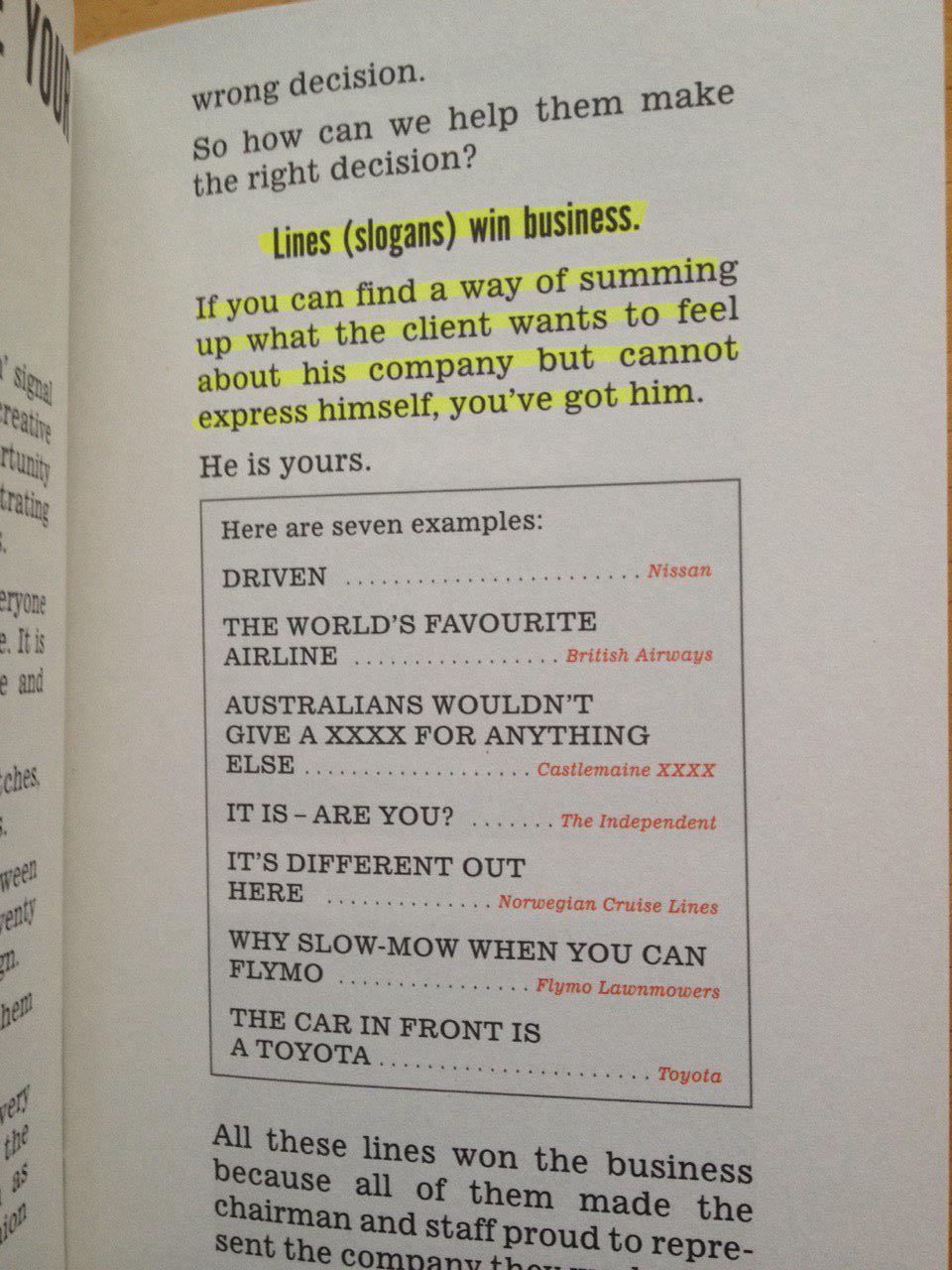
Lines (slogans) win business. If you can find a way of summing up what the client wants to feel about his company but cannot express himself, you’ve got him.

d13f22125918714f48527b7c632ec9e28e2417a273e425910893d8b48320299c

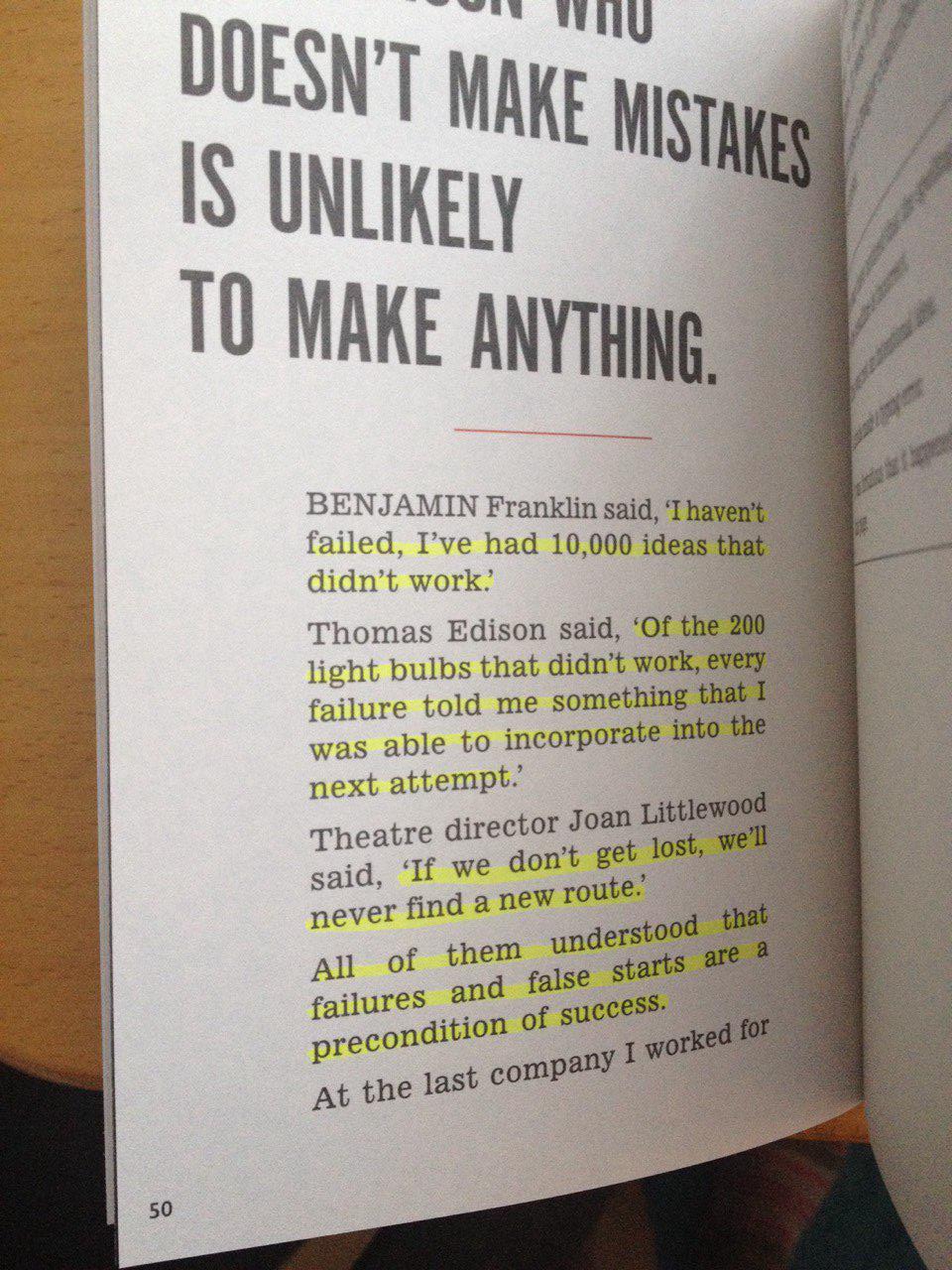
I haven’t failed. I’ve had 10000 ideas that didn’t work. ~ Benjamin Franklin

Of the 200 light bulbs that didn’t work, every failure told me something that I was able to incorporate into the next attempt.

If we don’t get lost, we’ll never find a new route.

All of them understand that failures and false starts are a precondition of success.

db0eeacabcfbb25c6429b30d6087647e32ae439cd89409fc412717a41dce50fd

Experience is opposite of being creative.

Give me the same as we had for the last 20 years but not quite. Only one client in 10k will actually mean ‘give me something I haven’t seen before’.

It’s better to fail in originality, than to succeed in imitation. ~ Herman Melville

Success is going from failure to failure with no loss of enthusiasm. ~Winston Churchill

The first thing to decide before you walk into any negotiation is what to do if the other fellow says no. ~ Ernest Bevin

There are no short cuts to any place worth going. Beverly Sills

Those who lack courage will always find a philosopy to justify it. ~Albert Camus

Some people take no mental exercise apart from jumping to conclusions. ~Harold Acton

What the mind can conceive, the mind can achieve. ~Clement Stone

Of everything seems under control you’re no going fast enough. ~ Mario Andretti

Going to church doesn’t make you a Christian anymore than going to a garage makes you a mechanic. ~Laurence Peter

A Technique for Getting Ideas by James Wood Young

It's Not How Good You Are, It's How Good You Want to Be – Paul Arden http://t.co/ELesySAtxI #books

— Nikola Brežnjak (@HitmanHR) October 5, 2015


Ionic, Stack Overflow

How to use ECMAScript 6 features in Ionic framework?

profile for Nikola at Stack Overflow, Q&A for professional and enthusiast programmers
I’m a big fan of Stack Overflow and I tend to contribute regularly (am currently in the top 0.X%). In this category (stackoverflow) of posts, I will be posting my top rated questions and answers. This, btw, is allowed as explained in the meta thread here.

As you may know, I’m really into Ionic framework lately and am helping out on StackOverflow with the knowledge I gained so far with the framework. I’m in the top 5 All time answerers.

I answered this question by user user5148540:

I recently used the new Set data structure specification instead of an array where I didn’t wanted any repeated values to be stored and it is working without problems, but I’m wondering I want to implement some of the new features such as let, class and const.

I’m using also the crosswalk plugin in case this is relevant.

Can anyone tell me if I should avoid ES6 for the moment or if its okay to be used?

My answer was:

I actually googled about this myself earlier today and I found this tutorial:http://labs.encoded.io/2015/06/22/use-es6-with-ionic/

StackOverflow encourages to not just use links as answers, so I’m just going to give my TL;DR, since this is not my own site and I don’t want to be held accountable for c/p.

Ionic uses Gulp, so install gulp-babel and gulp-plumber.

npm install --save-dev gulp-babel gulp-plumber

Add babel to gulpfile.js like so:

//...
var babel = require("gulp-babel");
var plumber = require("gulp-plumber");

var paths = {
  es6: ['./src/es6/*.js'],
  sass: ['./scss/**/*.scss']
};

gulp.task('default', ['babel', 'sass']);

gulp.task("babel", function () {
  return gulp.src(paths.es6)
    .pipe(plumber())
    .pipe(babel())
    .pipe(gulp.dest("www/js"));
});

//...

gulp.task('watch', function() {
  gulp.watch(paths.es6, ['babel']);
  gulp.watch(paths.sass, ['sass']);
});
//...

Edit ionic.project:

"gulpStartupTasks": [
    "babel",
    "sass",
    "watch"
 ],

For any more details consult the original link – and with this I also say thanks to the author of that blog post as it helped me too.

How to use #ECMAScript 6 features in #Ionic framework?http://t.co/kyur9xI2Dy pic.twitter.com/e2JCzStBKF

— Nikola Brežnjak (@HitmanHR) September 29, 2015

Page 31 of 53« First...1020«30313233»4050...Last »

Recent posts

  • Why You Should Start Blogging (Even If Nobody Will Read It)
  • Speed Reading
  • Impostor Syndrome
  • Why Strange Images Make You Remember Better
  • Productivity tip: rate things 1-10 without 7

Categories

  • Android (3)
  • Books (114)
    • Programming (22)
  • CodeProject (36)
  • Daily Thoughts (78)
  • DevThink (5)
  • Go (3)
  • iOS (5)
  • JavaScript (128)
    • Angular (4)
    • Angular 2 (3)
    • Ionic (61)
    • Ionic2 (2)
    • Ionic3 (8)
    • MEAN (3)
    • NodeJS (27)
    • Phaser (1)
    • React (1)
    • Three.js (1)
    • Vue.js (3)
  • Leadership (1)
  • Meetups (8)
  • Miscellaneou$ (84)
    • Breaking News (8)
    • CodeSchool (2)
    • Hacker Games (3)
    • Pluralsight (7)
    • Projects (2)
    • Sublime Text (2)
  • PHP (6)
  • Quick tips (44)
  • Servers (8)
    • Heroku (1)
    • Linux (3)
  • Stack Overflow (82)
  • Unity3D (9)
  • VibeCoding (2)
  • Windows (8)
    • C# (2)
    • WPF (3)
  • Wordpress (2)

"There's no short-term solution for a long-term result." ~ Greg Plitt

"Everything around you that you call life was made up by people that were no smarter than you." ~ S. Jobs

"Hard work beats talent when talent doesn't work hard." ~ Tim Notke

© since 2016 - Nikola Brežnjak