

Nikola Brežnjak blog - Tackling software development with a dose of humor
  • Home
  • About me
Home
About me
  • Nikola Brežnjak blog
  • Home
  • About me
DevThink

The Keyboard Layout That’s Making Us Type Slower

TL;DR

Why are we still using the QWERTY layout even if:

  • it makes our fingers ‘walk’ way more miles for the same amount of written text (supposedly as much as 1 to 12-20)
  • it makes us ~42% slower
  • it causes all sorts of repetitive strain injuries

Sounds like I made this up. But here, look it up for yourself:

"Dvorak estimated that the fingers of an average typist in his day travelled between 12 and 20 miles on a qwerty keyboard; the same text on a Dvorak keyboard would require only about one mile of travel." ~ MIT

"Dvorak “uses about 63% of the finger motion required by QWERTY” (i.e., ~37% less motion)" ~ Wikipedia

The reason for this is simple: we’ve always done it that way™. We just don’t know that there’s something better out there. And by better, I mean miles better.

The second, more practical reason is that the change is hard. Like, really hard. Imagine having to re-learn how to ride a bike… Doesn’t sound too fun, now does it? 🤦

I went through this myself a couple of years ago, and once I went through the hard period (frankly, took me a month), I never looked back.

! TL;DR

In this episode of the DevThink podcast, Shawn and I nerd out about something you touch every single day (and probably never question): your keyboard layout.

Specifically, we talk about the Dvorak Simplified Keyboard layout — why it exists, what problem it tries to solve, and what it actually feels like to switch when you’ve spent your whole life on QWERTY.

Here are some main takeaways from our chat…

“Dvorak sounds scary” is… a branding problem 😅

Shawn makes a good point early on: the layout is often called “Dvorak,” but the original intent was a simplified keyboard layout optimized for English typing. The name makes it feel like some niche, academic thing you need a monocle to try.

The core idea: less finger travel, more alternation

Dvorak was designed around English letter frequency:

  • Vowels on the left hand
  • Common consonants on the right
  • Lots of hand alternation, which can reduce strain
  • More work done by stronger fingers (index/middle), less by pinkies

You can summarize it as: “move less, reach less, suffer less.”

The hardware rant: staggered keyboards are a fossil

We also detour into a keyboard hardware topic I didn’t expect to love as much as I did: the TypeMatrix (http://www.typematrix.com/ – no affiliation) keyboard.

Shawn explains why most keyboards are staggered (mechanical typewriter constraints), and why that’s… kind of absurd in a world where the “bars that jam” problem no longer exists.

TypeMatrix goes with an ortholinear-ish grid, which makes touch typing feel more “logical” because you’re not constantly compensating for weird offsets.

My switch experience: the “first week pain” is real

I went into it thinking: “How hard can it be? I’m a touch typist.”

Well… cue dramatic music.

The first days were rough. The muscle memory you built over years doesn’t politely step aside. It fights back. Hard.

But after going cold turkey (no “just one quick QWERTY reply”), it started clicking:

  • Touch typing felt more natural with Dvorak (especially on TypeMatrix)
  • Speed improved week by week
  • The mental “map” started forming again

The phone question: does QWERTY thumbs ruin Dvorak hands?

This comes up a lot, and we talk about it directly:

  • Typing on a phone is a different motor skill (thumbs, not fingers)
  • Keeping QWERTY on mobile won’t necessarily “undo” your Dvorak learning
  • Shawn even mentions that he can’t type QWERTY on a computer anymore… but still uses QWERTY on his phone

So yeah—no need to panic and install 17 weird iOS keyboard apps unless you really want to.

If you’re considering switching, here are some practical takeaways

If you type mostly in English and spend a lot of time at the keyboard, experimenting with Dvorak is one of those rare “small change, big daily impact” things.

My personal advice (based on what I learned the hard way):

  • Expect the first week to feel like typing with oven mitts
  • If you can, do it during a slower period (vacation / lighter workload)
  • Decide early: cold turkey or mixed mode
    (mixed mode preserves QWERTY ability, but slows Dvorak mastery)

And voilà — your keyboard becomes a project. Because of course it does.

Transcript

Here’s the cleaned up transcript of my chat with Shawn (in case you wanna feed it into an LLM or something). If you want to listen to the recording, you can do so here (I suggest 1.5x speed as I speak too slow 🙂)

Shawn: Alright. Welcome back to the second DevThink podcast. This is Shawn Maločić, and with me is—

Nikola: Nikola Brežnjak.

Shawn: Today, we’re here to talk about the simplified keyboard layout, which is something that I’ve been using for about ten years. It’s more commonly known as the Dvorak layout because it was designed by a guy named August Dvorak and now bears his name—which I think is actually a big problem. The simplified keyboard layout is something a lot of people would be interested in learning, but “Dvorak” (d-v-o-r-a-k), syllables we don’t generally use in English, tends to make people think it’s something hard or scary.

I haven’t found it to be that, and I’ve found it to be very beneficial to my life. Nikola has been using it for, I guess, a few weeks now. Do you want to describe what it is, since you’re looking at it from a fresher perspective than I am?

Nikola: Yes. So basically, it’s a different layout. You can use the Dvorak layout on any keyboard. Of course, it would be kind of a pain if you were looking at the keyboard and it says “S” but it’s actually “O” if you switch. But then again, the advice you gave me was: do not look at the keyboard.

So yeah—basically, the letters are all mixed up based on this Dvorak guy. Actually, a side note: isn’t it actually pronounced “Dvorak”?

Shawn: It is. That’s actually probably the correct pronunciation. And I just want to mention: the layout was designed explicitly for the English language. So if you’re typing in English, this will be helpful.

The general idea is that the guy who invented it studied English words, phrases, sentences—whatever—and figured out how to minimize finger movement. So the keyboard is designed in such a way that if you were to type out an entire novel in both QWERTY (the standard English layout) and the simplified keyboard layout, your fingers would travel many, many miles less with Dvorak than with QWERTY.

Nikola: Yeah. I read somewhere that it’s actually 40% more finger movement on QWERTY than on Dvorak. And also all the vowels are on the left side of the keyboard. So in general, in English, you will alternate your hands when typing. There are almost no words you’ll ever type in English all with the same hand, which is nice because it reduces strain that way as well.

And then in addition: if you consider your ring finger and pinky finger to be weaker, and your index and middle finger to be stronger—the most frequently used keys you have to reach for or type are going to be with your index and middle finger. You do a lot less reaching. The less-used keys are the ones your pinky uses.

And then the home row—everyone knows “A S D F” … and “J K L ;”. Anyone who’s taken a class has done that. So compare “A S D F” with “A O E U”. That’s your home row with your left hand.

And the right hand—instead of “J K L ;”—is “S N T H”. I mean, are there any more commonly used letters in the English language than “S N T H”? And who uses semicolons except programmers on a regular basis?

Shawn: Yeah. So, anyways, as you said: “Nikola, try it.” I was like, “Okay,” because I’m going to do it. But then again, I remember one friend referring me to it before, and I looked at it and thought, “Are you crazy?”

But it was an awesome time to try it because we were on a break, so I was at home and I said: “I’m going to give it a go.”

Although—to be fair—I’m doing this on a keyboard you gave me, thank you very much. It’s actually a TypeMatrix keyboard.

So let’s put Dvorak aside: TypeMatrix… I love it. I honestly love it. And as you said, you could use QWERTY on it without a problem. I agree. People should look up that keyboard because I think it’s cool. Maybe you can say more about it, because you’ve been using it for how long again?

Shawn: I’ve been using it since February 2006. I will not use anything else.

Probably everyone listening to this has a keyboard based on a limitation of mechanical typewriters. Back in the day, every key you pressed raised a metal bar with a reversed letter that slammed into an ink ribbon and hit the paper. So if you look at your keyboard—just to pick two QWERTY characters at random—there’s “J” and “U”. J is on the home row, U is right above it.

If those metal bars were in direct line, you could never type J, because it would just slam into the U bar. So all the keys on your keyboard are staggered. Your top row isn’t perfectly aligned with your home row, which isn’t perfectly aligned with the bottom row.

We still—today—manufacture keyboards this way, which makes no sense. Not only do you have to learn which finger types which letter and whether it stays on the home row or reaches up and down—you also develop an instinct for whether you need to reach up and slightly left, or slightly right, or down and slightly left, or slightly right. There’s no sense in this.

So these people at TypeMatrix (typematrix.com)—I have no financial association with them—but I recommend everyone buys their keyboards because they are sane. They fixed this. I’ve been using it since February 2006 and I will never go back.

I’ve purchased extras and have them brand new in boxes in storage, just in case they become unavailable, because I don’t want to type on anything else.

Nikola: Awesome. Yeah.

What I noticed is that my fingers definitely don’t have to move as much. But also, I really see that in this setup, I don’t have to move my fingers much.

One thing: I’m in Croatia—born and raised, still living here—although I type mostly in English (like 99%), so that’s not an issue.

So how I started: I’ve been a touch typist—I can type very fast and I don’t need to look at the keyboard. On QWERTY I was very fast. That’s one thing. So I developed this muscle memory for certain keys—when you see the key in your mind before you even press it.

And now when I was trying Dvorak… oh dear God. First few days: a pain. Honestly, a pain.

To be fair: I had to reply to one ping on Slack very quickly, and I literally went on my laptop and typed the reply there. It felt… relieving.

But then I talked with you and you said: “Don’t do that, because you’re not progressing.” And I said: “Okay. If I’m going into this, I’m going cold turkey.”

And literally ever since then—so I’m on my third week now—I haven’t used anything else but this keyboard and the Dvorak layout. It’s gotten way better. Honestly, way better.

Here’s one thing: I think it’s way easier to do touch typing—using all of your fingers—with this layout, and especially with this keyboard.

Also: zero affiliation. You were the one who introduced me to it. So yes, I’m feeling there’s definitely something in it. I’m still not as fast as I was on QWERTY, but I’m sensing I’m developing new muscle memory for these keys.

One thing I brought up—and you said I shouldn’t worry—is that on my phone, I still have the QWERTY keyboard. And I felt that by using that, I’m going backwards, like not using Dvorak everywhere.

I installed some new keyboard on my iPhone, but I don’t like it because it’s not in the same row. But hey—I had a great app idea there. Maybe I’ll make it. We’ll see.

But as you said, I don’t have to worry about it, right?

Shawn: Right.

Here’s the thing. If you are in tech support, or if you work somewhere where you handle other people’s computers all day, or use other people’s terminals, you may have to type QWERTY.

You can always do a software change of the keyboard layout from QWERTY to Dvorak, and that’s fine. But if you feel it would be an undue burden to lose your QWERTY ability, then you have to continue to do QWERTY interspersed with Dvorak.

Because if you don’t, by the time you’ve learned Dvorak fluently, you will actually have lost your QWERTY.

I typed QWERTY for over a dozen years. When I switched, I went cold turkey, never looked back, and I completely lost my QWERTY.

However, on phones, they didn’t have a Dvorak layout, so I just continued typing with my thumbs on QWERTY.

A couple years ago, I found I could actually get a Dvorak layout on my phone, and I switched to it—and I was completely lost. I just went back to QWERTY on the phone.

When I type with my thumbs, I use QWERTY. If you put a gun to my head and made me type QWERTY on a computer keyboard, I would not be able to do it. But it’s the only thing I know how to type with my thumbs. So I don’t think it’s a detriment to continue thumb typing with whatever you want—or swipe typing, whatever.

Nikola: Awesome. Awesome.

Anyways, that’s it for now. We’re going to do a follow-up when I’m “converted,” so stay tuned for that episode.

And until then—try it. You’ll see. I definitely see the benefit.

If you asked me two weeks ago, I would tell you: “Okay, that’s kind of how I am. I will try it. I will give it a fair shot.” But at that time I was like: “This cannot work.”

Now I’m like: “Okay. This will definitely work. I love it. Just give me a bit more time.”

So yeah… try it. See if this is something you may benefit from.

Anyways, till next time.

Shawn: Yeah. Look it up. Do some research for yourself, and let us know what you think.

Nikola: Awesome. See you, guys.

Shawn: Alright. Bye.

Thank you for listening to the DevThink podcast. To reach us for feedback, show suggestions, or any other comments, email us at [email protected]. That’s devth.ink.
Quick tips

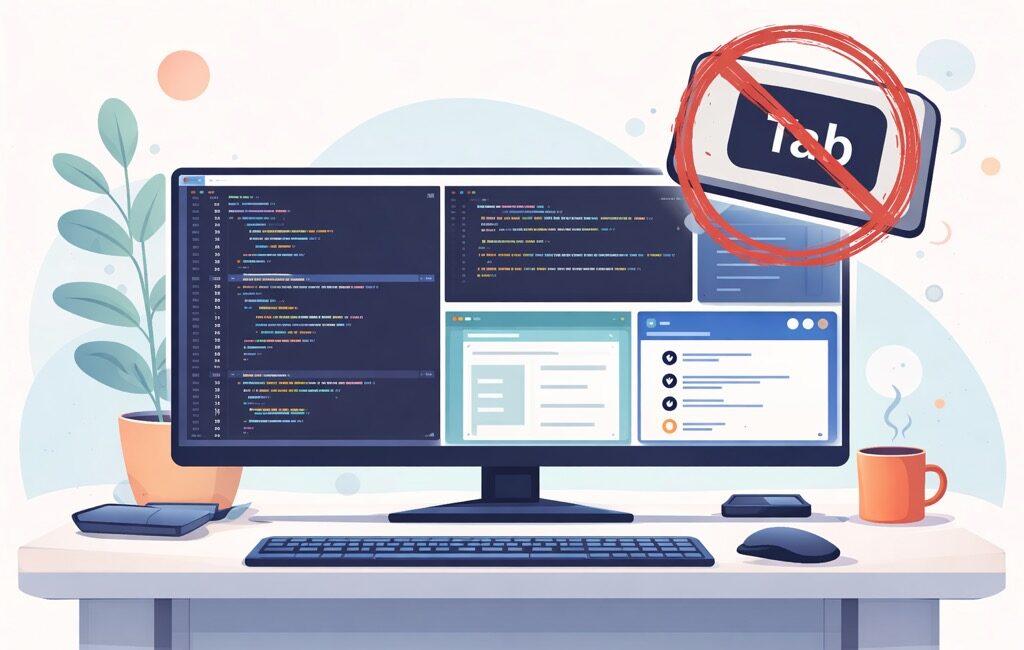
Stop Tabbing. Start Using Your Monitor

OK, I admit, this one is going to be weird. So, buckle up…

Tabbing feels like it costs a second. It doesn’t. It costs your train of thought.

You know the move: you’re testing the app and it’s crashing, you’re mid-sentence of screaming at prompting your favorite LLM to fix it, and then you Alt+Tab (CMD + Tab for fellow Mac users) to Slack "just for a sec", then you come back and… reread the last 15 lines like it’s a novel you forgot the plot of.

Hot take: tabbing is a context tax. And it adds up fast.

TL;DR

  • The real cost of tabbing isn’t the switch — it’s the mental reload after.
  • The easiest fix isn’t discipline, it’s layout: make your screen a multi-window workspace.
  • Use a big monitor + split your apps into a "cockpit" so you don’t need to switch contexts.
  • On macOS, use Spectacle (not affiliated) or some other window tiling app

The real problem: you’re not switching apps, you’re switching brains

If you had to physically stand up and walk to another desk every time you checked Slack, you’d do it less.

Alt+Tab is the "teleport" version of that walk — and that’s exactly why it’s dangerous. It’s frictionless distraction.

Because when you tab away, you don’t just lose what’s on the screen, you lose:

  • the next step you were about to do,
  • the mental model of the code,
  • and whatever fragile "flow" you managed to summon that day

The cheat code: stop tabbing by making your monitor do the work

This is the part nobody tells you:

The best productivity "hack" is having everything visible at once.

Not 27 windows stacked like lasagna. I mean a deliberate layout where your brain doesn’t have to switch, it only has to look.

A bigger monitor helps because you can run a real multi-window layout, for example:

  • Left (60–70%): editor (VS Code / IntelliJ)
  • Right top: terminal (tests, logs, git)
  • Right bottom: browser (docs / ticket) / ChatGPT

⚠️ Note to you, dear reader, if you’re using some layout like that: share it in the comments, I’m curious to hear what’s been working for you.

Oh, and BTW, if Slack is visible, you don’t "check Slack". You just notice if something is urgent. And 95% of the time… it isn’t. Also, don’t get me started on email…

Spectacle on macOS: the "I refuse to drag windows" tool

The reason people tab is often stupid-simple:

"My windows are annoying to manage."

or

"My screen is just too small."

I can’t help you with the 2nd one (tell your boss you need a bigger/external monitor 🤷‍♂️ – tell them, politely, that some dude on the Internetz sent you), but as far as the 1st one goes, you end up stacking everything and flipping through it like TV channels.

That’s where Spectacle comes in.

It’s a lightweight macOS app that lets you snap windows into positions using keyboard shortcuts:

  • left half
  • right half
  • quarters
  • maximize

So instead of:

  • "drag… resize… oops wrong size… now I’ll just tab…"

You press a keyboard shortcut, and the window goes exactly where you want.

The next you know it, voilà — your screen becomes a workspace, not a pile of rectangles.

Goal: reduce tabbing by making switching unnecessary.

A simple "no-tab" layout you can try today

Here’s a clean starter layout (works great on a 27" or ultrawide):

  1. Editor: left side (primary focus)
  2. Terminal: right side (top)
  3. Browser/docs/ChatGPT: right side (bottom)

That’s it.

You’ll be shocked how often you tab just to peek at something that could’ve been visible all along.

One tiny habit that helps even with a perfect layout

Sometimes you still need to switch (different project, different doc, whatever). Before you do:

Write one line somewhere (notes, TODO comment, sticky note):

"Next: update handler → rerun tests → fix validation error"

That single sentence is a bookmark for your brain.

Wrap-up

Tabbing isn’t evil. It’s just expensive.

If you want the cheapest win:

  • get a bigger monitor (or use what you already have smarter),
  • build a consistent multi-window layout like Spectacle on a Mac,
  • and turn "tabbing" into something you do intentionally, not reflexively.

Because the fastest way to stay in flow isn’t to "focus harder".

It’s making it harder to accidentally leave.

Stack Overflow

StackOverflow – Was It Worth It?

TL;DR

By now, everyone has probably seen this (or a similar version) graph:

stackoverflow questions

So, let’s not dwell on it, shall we? It was nice (great even), when it lasted.

Nowadays, it’s better to work on your Github profile or actually building/publishing.

That’s it, going back to my terminal to see if Clawdbot/Moltbot/OpenBot needs my attention, ciao 👋

Yes, our (programming) world is changing, and I hope you’re keeping up…

!TL;DR

Back in 2018, my friend Shawn Milochik and I discussed on our DevThink podcast if it’s still worth it to build a portfolio on StackOverflow. It was our 1st episode.

Then, I thought that building the profile there was still valuable, especially if you wanted to change jobs, but I also agreed that having an active Github account is also important (maybe even more so) as you can show people what you can do with the code, and ‘code does not lie’.

Moreso, if you didn’t care about the vanity points you may want to do it because of your own satisfaction of helping people.

Because it took a lot of effort to actually get to a certain number of reputation points on StackOverflow, I would argue that one developed a decent set of skills (writing, explaining, thinking).

So, IMHO, it was totally worth it. And wonder if a similar network will ever arise in our agent-first world.

Here’s the recording, and below is the transcript in case anyone is interested.

Fun thought: folks listening this in 10y from now may be like: lol, they still actually wrote code back then 🙂.

Nikola

This is a question I get asked a lot, mainly because I have a profile with more than 15k rep:

Nikola

Shawn

I have a profile on StackOverflow, and created it just because I wanted to post a question or upvote someone’s answer one time or another, but I have a pretty low ranking and I’ve never sought out higher one.

I have no idea why anyone would want to cultivate a high ranking unless it was for the purpose of getting a job. But then again, it doesn’t seem to compare to your Github profile.

Nikola

I created mine in 2010, and I was only asking questions for a very very long time. However, it turned out that those questions were very good because I got a lot of upvotes on them. The first time I started answering questions was when I had to create a mobile version of some site and I was using jQuery Mobile and found a lot of questions to which I knew the answer because I read some book about it, and had experience with it. At that time I had around 300 points, and after I started answering I quickly got to 2K.

Flash forward today, I am approaching the 10 K, and what I have to say about that is that my experience with it is very good, because I got admited to one freelance site without any interviews, just by providing my StackOverflow profile link.

I think it’s valuable if you want to change jobs, but I also agree that having an active Github account is also important (maybe even more so) as you can show people what you can do with the code, and ‘code does not lie’.

Shawn

I’ve hired and interviewed quite a bit since about 2010, and I don’t remember ever asking about or being presented with an applicant’s StackOverflow account but definitely have asked for or been presented with their Github account in the resume.

Nikola

The dean of our university used to joke that our graduates find a job in maximum three days depending on when the weekend falls. To extrapolate on that one, having a very good StackOverflow profile makes you very desirable. When you have a certain amount of reputation points (reps) you get recruiter emails (if you allow the option in StackOverflow settings).

I met people who don’t care about the points. Instead, they only do it because of their own satisfaction of helping people.

Shawn

When I was doing Django pretty heavily from 2009-2012, I was on the Django users mailing list every day. I’ve seen plenty people ask questions where it was obvious that they were lazy and they didn’t take the time to figure out how to ask the question so that they could be helped.

I had a habit of making sure I can explain the question pretty clearly, and trying to find the answer myself first. What happened was almost all the time I was able to answer my own questions and almost never ask a question.

I found that I was answering a lot of questions for a few years and there were multiple times that years later when one of the developers on my team would come to me and say:

"Hey I had this problem and I did a Google search and I found the answer, and you wrote it"

So, you can definitely contribute in a way that doesn’t acrew any points or reputation.

To touch on the Github mention, I would look at the actual code in the Github profile and not just the number of stars.

Nikola

Since I know that it takes a lot of effort to actually get to a certain number of reputation points on StackOverflow, I would argue that this person is very good because I myself know that it’s not an easy task to do.

Newbies complain too much

New members don’t seem to like StackOverflow (and there’s even a term SO police) because most of their questions go along the lines of: "help me connect to the database".

I don’t have respect for those kind of people because they didn’t read the rules, or the FAQ.

If you want me to help you, then at least put in some effort. Usual answers to these kind of questions are: ‘What have you tried?’. And then they wouldn’t have anything to show for it.

Usually those people go away, and honestly you don’t want to have them in the community. I may be too harsh, but if you want me to give you my time for free, then please show that you really took some effort and did some researching. If you’re a beginner there is probably 99% chance that there already is same/similar question because you’re not as advanced so you don’t have a specific question that you need a professional to answer you.

So, is it good of an investment to do that nowadays?

Maybe not in Java, maybe not in PHP, or any of those languages that have been with us for a long time. But, it may be a very good idea to do it with a certain new technology because that will help you to place yourself as a master in the field.

If people search for something in a certain technology or language and your name constantly keeps popping up, and if they have a company that’s searching for some specific answers and you already answered them for free on ten questions, if they really need some additional help they’ll certainly reach out to you.

Beware of the help vampires

Shawn

It’s definitely good to have reputation, but at the same time you want to avoid what we used to call a ‘help vampire’. That’s someone who after they ask a question, and you give them an answer will immediately come back with the next problem. They’re basically having you do their homework and keep wasting your time. The whole point of helping someone is you want to say:

Oh, you’re a smart person, you’re trying and you got stuck because you don’t know what you’re doing as you’re new to this. That’s totally reasonable, so let me help you get over this little hurdle, so you can see the other side and then you can have smooth sailing from there on.

Nikola

This can happen on StackOverflow as well, but when someone keeps asking the followup questions in the comments you just ask them to make a new question.

They rarely do that, either because of laziness or frustration. I think that these kind of people came to this industry for the wrong reasons because if you don’t see real true pure joy in finding out things for yourself then you won’t last long here. I remember when I was starting out, that I couldn’t figure out something for like a week and then, when I finally got it, it was the best feeling ever! It’s one of the things that gets me going in this field.

Shawn

I agree that it’s how it should be. There’s a very famous person on the internet called Eric S. Raymond (wrote the art of unix programming) who wrote this post called how to ask questions the smart way. I think there’s really good stuff there like:

  • before you ask try to find an answer by searching the archives
  • try to find an answer by doing a web search
  • try to find an answer by reading the manual
  • read the FAQ
  • experiment with it yourself to try to figure it out

The questions like "how do I connect to a database in language X" very clearly show that they didn’t do any of those things

What we do is a craft, and not just something that anyone can do 9-5 and then go home and sit on the couch and watch TV and drink beer without it being a part of their life.

Nikola

If you clock in the 8 hours and you can’t wait to come home and do something else then honestly I would really question if this is something that you’re put on this Earth to do.

Shawn

I read this blog post about a kid from Nigeria who wanted to become a programmer but couldn’t afford a laptop, so he started with his Nokia phone and in the end ended in an MIT backed startup.

Then you contrast that with someone who has a computer, and an internet connection that works perfectly fine and a full keyboard and then they can’t even be bothered to figure out the first thing about what they’re trying to do!?

Talent is overrated

Nikola

I agree and am going to pull a parallel here with a book that I’m currently reading called How to teach your baby to read. I’m not going to go into the details of why and how, but the thing is that they were actually working with brain damaged children and what they were able to do with them is that they read on a level of a normal child. Now, if we all would be willing to work harder, I’m wondering how much more would we advance. We’re not using our potential and that’s sad.

Shawn

Malcolm Gladwell, in his book Outliers, interviewed some violin teachers who said that if you compare someone with a lot of talent to someone who’s not as talented but is putting in more practice hours, they will be way better in five years. It doesn’t matter what you start with as much as how much you practice. Of course, practice is not just repetition, it’s also doing something while intentionally paying attention to what you’re doing and noticing the outcome and making adjustments and so on. That’s known as deliberate practice.

Nikola

We’ve derailed this podcast from StackOverflow, but I want to say that I have on my website three basic quotes that I love and one of them is:

hard work beats talent when talent doesn’t work hard

Conclusion

Nikola

Definitely create a StackOverflow account. Before you ask any questions please read the FAQ, and please try to be as thorough as possible. Many times you will find out that by asking a question in the concise way you will actually find out the answer yourself. Pro tip: don’t try get points in a very established language, try to do it in some new language/areas/framework.

Shawn

Do it, as it can’t hurt. If you like to help people anyway, you might as well get a little credit for it. It can also be addictive, and a good way to pass the time. If you’re going to be online watching YouTube videos and clicking funny memes and things like that and wasting your time and not being productive, you might as well spend that time on StackOverflow helping others because it feels really good and on top of that if you’ve ever done it you learn so much by teaching and helping others.

Our profession is so huge and wide that even if you’re an expert in a language you use every day, you don’t use every single aspect of it based on the industry you work in, or you know other factors so sometimes someone asks a little question that’s seems easy and you’ll learn a little bit better about that you learn about the tools you use everyday so definitely go for it.

Miscellaneou$

Get in the Habit of Learning Daily

TL;DR

  • In software, daily learning is the real career cheat code.
  • Use the Feynman technique to turn “I think I get it” into real understanding.
  • Read less, summarize more (processing beats re-reading).
  • Apply the 30‑second rule: summarize right after reading, in your own words.
  • Use a Mind Palace (Ramon Campayo style) for flows/lists you must recall fast (e.g., OAuth, some architecture, etc.).

As pompous as it may sound, we do need to work on ourselves, or we’re just gonna fall behind. There’s no stagnation in learning; it’s only going downhill.

And in software engineering, that’s not motivational woohoo new age stuff; it’s just a reality. The tools change, the “best practices” change, and the stuff you learned two years ago might now be a footnote in a migration guide. And don’t even get me started on all the AI tools (or let alone models)…

So if you opted for a software engineering field (and, I hope, for good reasons – $$$ not being one of them), one would expect from you that you have it clear in your mind that you’re in for the long run and for life-long learning. You’ve heard this one; it’s a marathon…

Here I’m going to share few of the techniques that I picked up along that long way, and will be updating the post once I find something new and useful.

The goal isn’t to “learn everything” (because… good luck with that 😅). The goal is to build a habit that compounds. Ten minutes a day beats a weekend binge once a month — especially if you actually retain what you learn.

Let’s get into the techniques.

The Feynman technique

This one is simple, slightly uncomfortable (in a good way), and brutally effective.

Step 1. Choose the concept you want to understand

Take a blank piece of paper and write that concept at the top of the page.

Step 2. Pretend you’re teaching the idea to someone else

Write out an explanation of the topic, as if you were trying to teach it to a new student.

When you explain the idea this way you get a better idea of what you understand and where you might have some gaps.

Step 3. If you get stuck, go back to the book

Whenever you get stuck, go back to the source material and re-learn that part of the material until you get it enough that you can explain it on paper.

Step 4. Simplify your language

The goal is to use your words, not the words of the source material.

If your explanation is wordy or confusing, that’s an indication that you might not understand the idea as well as you thought – try to simplify the language or create an analogy to better understand it.

Quick takeaway: if you can’t explain it simply, you don’t understand it well enough yet. And that’s fine — now you know exactly what to fix.

Read less, but process more

It’s better to read 10 pages and then write your own summary of it than to read 10 pages 5 times.

This is one of those things that sounds obvious, but most of us still don’t do it. We re-read because it feels productive. But writing a short summary forces your brain to do the actual work.

⚠️ No, AI sumarizing it for you just isn’t the same thing.

If you want a tiny routine that works:

  1. Read 5–10 pages (or one article).
  2. Close it.
  3. Write 5–10 bullet points in your own words.
  4. Bonus: write one “so what?” sentence (why this matters).

That’s it. Not fancy, but works like a charm.

The 30-second rule

This one is actually an addendum to the one above. Right after you read an article sum it up in 30 seconds in your own words.

I love this because it’s so small you can’t really complain you “don’t have time”.

Right after you finish reading, ask yourself:

  • What was this about?
  • What’s the main idea?
  • What will I do differently because of it?

Then say it out loud, or type it into Notes / Notion / a journal / Slack DM to yourself / add it to SOUL.md. Whatever. Just make it yours.

And voilà — your brain gets a “hey, this matters” signal.

Memory Palace

Think of it as saving knowledge into a “place” you can walk through later.

How it works:

  • Pick a place you know well (your apartment, your office, your route to the gym).
  • Choose 5–10 fixed “stations” in it (door, couch, kitchen sink, balcony…).
  • Attach each thing you want to remember to one station using a vivid, slightly ridiculous image.
  • To recall: mentally walk through the place and “see” each station again.

Your brain is insanely good at remembering places + visuals, so we’re basically cheating by storing information in that format.

Example: memorizing the OAuth authorization code flow

Let’s say you keep mixing up the steps. Put them into your apartment:

  1. Front door → User clicks “Sign in with Google” (imagine a giant Google logo as a doormat).
  2. Hallway mirror → Redirect to Authorization Server (mirror “redirects” you somewhere else).
  3. Couch → User consents (a big “Allow” button is sitting on the couch).
  4. Kitchen sink → Authorization code returned to your app (a “CODE” label floating in the water).
  5. Fridge → App exchanges code for tokens (fridge opens and spits out “ACCESS TOKEN” and “REFRESH TOKEN” cans).

Now when you need it, you don’t “remember text” — you just walk through your apartment and the steps pop out.

Where this shines:

  • flows (auth, payments, onboarding)
  • checklists (incident response, release steps)
  • “I always forget the order” problems

You may want to dig into this one a bit more, and here is a great book to do so: Moonwalking with Einstein.

F motivation -> make it automatic

Here’s the part most people skip: make daily learning automatic.

A simple setup:

  • Pick a daily slot: right after coffee, during lunch, before bed (IMHO, the hardest, and I don’t recommend it for anything except light reading to fall asleep easier).
  • Pick a tiny goal: 10 minutes, 1 article, 5 pages, 1 concept.
  • Pick a capture format: one note per day (title + 5 bullets).

If you want the lowest friction version: do the 30-second rule only. Every day. No excuses. Even on days when you’re tired and your brain feels like mashed potatoes.

Conclusion

You don’t need to “go hard” to get better. You need to be consistent.

Working on yourself daily is basically the job description in software engineering. The tech changes, the tools change, the expectations change — but the habit of learning daily keeps you steady. Even if AI does "take our jobs", being someone who can grasp/learn things quickly is going to be a differentiator.

Use the Feynman technique when you want real understanding, use short summaries to retain more, use the 30-second rule to make it effortless, and sprinkle in memory techniques like the mind palace when you want to remember more than your brain would normally allow.

Like I said, I’ll keep updating this post once I find something new and useful.

If you’ve got something that made a difference for you, hit me up in the comments 👍

Miscellaneou$

Be Fearful When Others Are Greedy and Greedy When Others Are Fearful

⚠️ I wrote this in 2016 (yes, 10 years ago), and never actually hit publish 🤦

I found it now while I was going through my drafts. What’s funny is that it holds true today more than ever…

So, I’m hitting publish this time:

The title is a quote by the ever-so-slightly-great Warren Buffett, and it’s worth repeating:

Be Fearful When Others Are Greedy and Greedy When Others Are Fearful

See, today (11.11.2016) I got a taste of that medicine. As you may know, yesterday my fellow Americans voted in a new president, and I thought the dollar would plummet. Quickly, after reading a few headlines, I rushed to convert all my hard-earned $ into my local currency. However, what do you know — by the end of the day, the market “welcomed” this, and if I had just waited one day to see whether it would fall further, I could’ve exchanged then. Instead, I missed out on 0.7% in just one day.

The percentage may sound funny to you; however, given the amount, I learned a valuable lesson the hard way. And, as it seems, those are the only ones that “stick”.

In hope of a better future self; I wish you well, dear Padawan.

It seems that we’ve turned into mere “headline readers,” without even reading the content — let alone reading a book on the topic, or, God forbid, spending some time researching the subject. All we do is read the headline and immediately form an opinion. That doesn’t sound too scientific to me.

So, dear people, please read and research more. Oh, and on that point of research: I’m not talking about “I hold one opinion, let’s Google that and see what I find.” I can guarantee you’ll find websites that affirm your thoughts. However, did you know there are so-called “content generators” that create content so searchers like you find it — boosting view counts and helping dumb us down as a race?

We’ve got to snap out of this Matrix.

Miscellaneou$

How to find a branch parent in Git

You know that moment when you’re staring at a branch named feature/whatever and thinking:

"Cool… but what was this branched off from?"

Maybe you’re cleaning up old branches, reviewing a PR, or trying to figure out why feature/foo contains commits from three different universes. Either way: Git doesn’t explicitly store "parent branch" metadata (because branches are just pointers to commits). But we can usually infer it.

In this post, we’ll use a practical one-liner that prints the most likely parent branch of your current branch.

What we’re building

A small command that you can run on any branch to get a best-guess "parent branch" name.

Here’s the solution:

git show-branch | sed "s/].*//" | grep "\*" | grep -v "$(git rev-parse --abbrev-ref HEAD)" | head -n1 | sed "s/^.*\[//"

If you like, you can wrap it in a function later so it’s easier to run. But first, let’s understand what’s going on.

The command (run it on the branch you’re investigating)

Step 1: checkout the branch:

git checkout feature/my-branch

Step 2: run the one-liner:

git show-branch | sed "s/].*//" | grep "\*" | grep -v "$(git rev-parse --abbrev-ref HEAD)" | head -n1 | sed "s/^.*\[//"

What you’ll get back

Something like:

main

Meaning: "Given what I see in the commit graph, main looks like the most likely branch this one came from."

And voilà, your repo just got a little less mysterious.

How it works (without turning this into a PhD)

This is a pipeline. Each part trims the output until we’re left with a single branch name.

1) git show-branch

This command prints a compact view of commits and the branches they belong to. It’s useful when you want to compare branches and see where they intersect.

The raw output is noisy, but it includes bracketed branch names like:

* [main] ...
 ! [feature/my-branch] ...

2) sed "s/].*//"

This removes everything after the ], leaving just:

* [main
 ! [feature/my-branch

We’re basically stripping commit messages and keeping only the branch label portion.

3) grep "\*"

This keeps only lines containing *.

In git show-branch output, * is used to highlight a particular row of interest across branches (in practice, it helps narrow candidates to "closest" related branches).

4) grep -v "$(git rev-parse --abbrev-ref HEAD)"

Now we remove the current branch name from the list.

Because if Git returns your branch as its own parent, that’s not helpful (and slightly insulting).

git rev-parse --abbrev-ref HEAD prints the current branch name, so this part is a clean "exclude me".

5) head -n1

We take the first remaining match—basically the best candidate from the top.

This is one reason I call the output a "best guess". It’s a very useful guess, but it’s still based on how git show-branch orders things.

6) sed "s/^.*\[//"

Finally, remove everything up to the [, so we’re left with just:

main

Quick recap ✅

At this point, you have a one-liner that prints the most likely parent branch, a quick way to sanity-check where a feature branch probably started, and a decent understanding of the pipe magic so it doesn’t feel like copy-paste sorcery.

Make it easier to use (optional but recommended)

If you find yourself using this often, add a helper function to your shell config (~/.zshrc or ~/.bashrc):

git-parent() {
  git show-branch \
    | sed "s/].*//" \
    | grep "\*" \
    | grep -v "$(git rev-parse --abbrev-ref HEAD)" \
    | head -n1 \
    | sed "s/^.*\[//"
}

Now you can just run:

git-parent

Much nicer.

Caveats (because Git is Git)

This works best when your repo follows a normal branching model (feature branches off main/master/develop), when you have the relevant branches locally (run git fetch --all if needed), and when your history hasn’t been heavily rewritten in weird ways.

Things that can confuse "parent branch" inference: rebasing after branching, lots of cherry-picks from multiple branches, branching off a feature branch and then merging from other places, or when the real parent branch was deleted.

So treat the output as: "most likely parent branch", not a guaranteed truth.

Want to read more?

If you want to go beyond "best guess" and explore exact branch points, merge-bases, fork-points, and different strategies, these two Stack Overflow threads are gold:

http://stackoverflow.com/questions/1527234/finding-a-branch-point-with-git

http://stackoverflow.com/questions/3161204/find-the-parent-branch-of-a-git-branch

Final thoughts

Git doesn’t store a "parent branch", but with the commit graph and a bit of filtering, you can usually infer it quickly:

git show-branch | sed "s/].*//" | grep "\*" | grep -v "$(git rev-parse --abbrev-ref HEAD)" | head -n1 | sed "s/^.*\[//"

Next time someone asks "where did this branch come from?", you’ll have an answer—and you won’t even need to blame your coworker. 😉

Quick tips

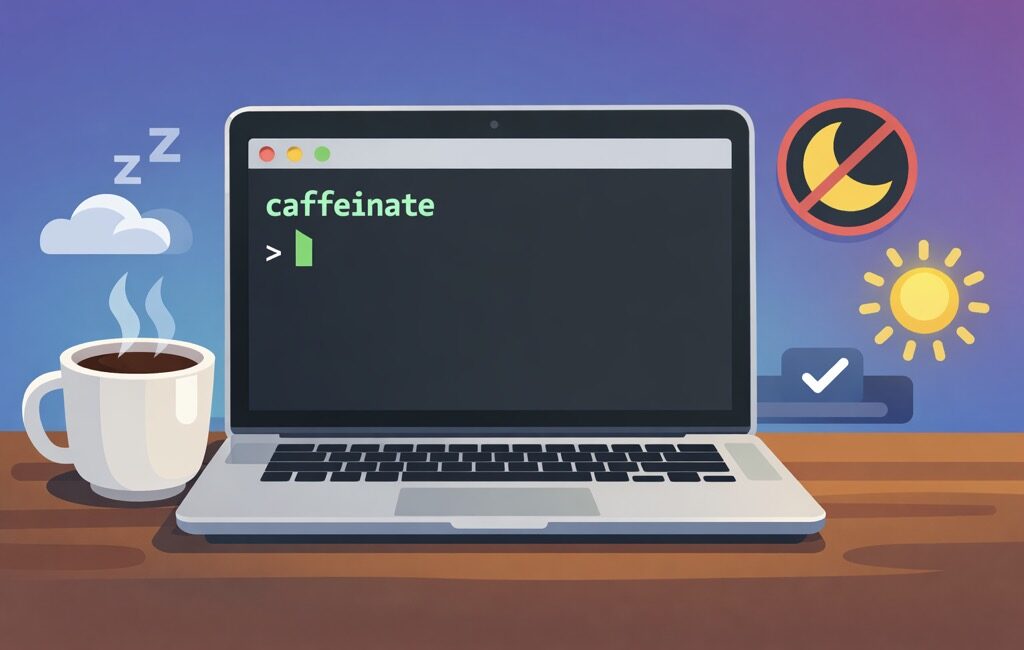
Caffeinate your Mac to prevent it from sleeping

TL;DR

I’ll show you how to use macOS’s built-in caffeinate command to keep your Mac awake:

  • until you stop it
  • for a set amount of time, or
  • only while a long-running command is executing

No additional apps that you need to install, no menu bar junk, no "why is my Mac sleeping again?!" drama.

Why you’d care about caffeinate

If you’ve ever kicked off a long download, rsync backup, Docker build, video export, or "I’ll just run this migration quickly" job… and then came back to find your Mac politely sleeping like an innocent kitten — you already know why this matters.

macOS has an official tool for this, and it’s been sitting right under your nose:

caffeinate

It’s basically the Terminal equivalent of "No, macOS, we are not done here."

Option #0: The simplest possible usage

Open Terminal and run:

caffeinate

That’s it. Your Mac won’t go idle-sleep as long as this process is running.

To stop it press Ctrl + C

Option #1: Keep the Mac awake for a fixed amount of time

Sometimes you just want to keep your Mac awake for 2 hours (and keep that Slack icon 🟢 hey, I don’t judge), and then you’d pass in the -t parameter (which indicates seconds):

caffeinate -t 7200

That’s 2 hours (60 60 2 = 7200). Yes, we still count seconds like it’s 1999.

A few common ones:

  • 30 minutes: 1800
  • 1 hour: 3600
  • 2 hours: 7200
  • 4 hours: 14400

Option #2: Keep the display awake as well

If for some reason you want to prevent your display from dimming, use the -d switch:

caffeinate -d

Option #3: The best trick — keep Mac awake only while a command runs

This is the chef’s kiss use case; instead of running caffeinate separately, wrap your long-running command with it:

caffeinate -i your_command_here

Example: big rsync backup:

caffeinate -i rsync -av ~/Pictures/ /Volumes/Backup/Pictures/

Example: long npm build:

caffeinate -i npm run build

Example: running tests that take forever because you’re "testing thoroughly" (and definitely not because of that one integration suite):

caffeinate -i ./run-tests.sh

When your command finishes, caffeinate stops automatically. No cleanup required. No "wait, did I leave it running overnight?" paranoia.

Option #4: Run caffeinate in the background

If you want to keep your Terminal usable:

caffeinate -d -i &

That & sends it to the background.

Want to see it?

ps aux | grep caffeinate

Want to stop it?

Option A: bring it back to foreground and stop:

fg

then hit Ctrl + C

Option B: kill it by PID (you’ll see PID in the ps output):

kill <PID>

Handy flag cheat sheet

Here’s the "print this on a sticky note" version:

  • Keep system awake until stopped:

    caffeinate
  • Keep awake for 1 hour:

    caffeinate -t 3600
  • Keep display awake:

    caffeinate -d
  • Keep awake while a command runs:

    caffeinate -i 
  • Display + system, background:

    caffeinate -d -i &

Bonus: a tiny alias (because typing is hard)

If you find yourself using it often, add this to your ~/.zshrc (or ~/.bashrc):

alias awake='caffeinate -d -i'

Reload:

source ~/.zshrc

Now you can do:

awake rsync -av ~/Stuff/ /Volumes/Backup/Stuff/

And voilà — your Mac stays awake, your command runs, and you look like you totally planned it this way.

Hope this was useful, and see you next time 💪

VibeCoding

Vibe Coding a Pokémon Search App with Cursor

TL;DR

We’re going to build a Pokémon search app. But we’re not going to write even one line of code.

🤨

I know, coming from a developer (who used to take pride in what… we’ll call "handcrafted artisanal code"), this sounds like heresy.

But stay with me here and see how far these kind of tools have come in only the last year.

We’ll be building the app using the so-called vibe coding. Basically: you "talk" to the editor, the editor writes the code, and you navigate aka prompt it toward the final product (that you’ll be happy with 🤞).

Programmers/Coders/Engineers – we’ve always liked to tell/instruct computers what to do. That’s still true, only the syntax got… conversational 🙂

Who would’ve thought 🤷‍♂️

~ Nikola Brežnjak on X

In my previous post, I did this with Replit: Vibe Coding a Pokémon Search App with Replit.

This time we’ll do the same thing, step-by-step, but with Cursor.

Same app. Same flow. Different tool. More "local dev" vibes (yup, puns still need some work).

The Tools

In this post, we’ll be using Cursor: https://www.cursor.com/.

Cursor is a code editor (much like Visual Studio Code – VSC – actually, its fork, in Github terms), but with an AI Agent that can plan and implement changes across your codebase. It’s like pair-programming… except your pair doesn’t need bathroom breaks.

For bonus points, we won’t even type anything. Instead, we’ll use our voice to code (🤯, I know) with *WisprFlow (or alternatives like SuperWhisper / VoiceTypr).

The Old Ways™

Previously, I wrote the "classic" (may I say, "old" at this point?) tutorials building the same app with two different tech stacks:

  • Getting started with Vue.js 3 by building a Pokemon search application
  • Getting started with React by building a Pokemon search application

This one is different.

Same Pokémon search app.

Less typing.

More vibes (😂 I know, I know).

Let’s Start Prompting

If you want to follow along:

  1. (Download, Install) Open Cursor
  2. Create a new empty folder (e.g. pokemon-cursor)
  3. Open that folder in Cursor
  4. Open the "AI chat" pane (Command + i) and make sure you select the Plan mode

Pro tip: copy/paste these and adapt in case you’re feeling adventurous.

Prompt 1: Spec first, code later

First of all, always start with a plan before writing any code.

In the Replit post, I started with a simple prompt and then clicked Replit’s Improve prompt button.

I like that "improved" prompt better as:

  • it’s more specific about what the app should do (less back-and-forth)
  • it includes UI style guidance (so you don’t get "default HTML 2003 vibes")
  • it forces a PRD + checklist (so you can hold the AI accountable)

So… let’s use that improved prompt here too 👇

Paste this into Cursor (Plan mode):

A comprehensive web-based Pokémon search application that allows users to discover and view detailed information about Pokémon using the PokéAPI.

Core Features:

  • Search Pokémon by name or ID (bonus: autocomplete suggestions if it’s simple)
  • Display detailed Pokémon information (stats, types, abilities, sprites)
  • Browse Pokémon list with pagination (if it makes sense; keep it simple)
  • Responsive design that works on mobile and desktop devices

Visual References:

Inspired by the official Pokémon website and Pokédex interfaces, using vibrant, game-accurate designs and intuitive card-based layouts.

Style Guide:

  • Colors: Primary #FFCB05 (Pokémon yellow), Secondary #3D7DCA (Pokémon blue), Accent #CC0000 (Pokémon red), Text #2A2A2A (dark grey), Card Background #FFFFFF (white)
  • Design: Flexo/Poppins/Roboto fonts, card-based grid layout, mobile-first approach, clean search interface with prominent search bar

Special Requirements:

  • Must include a detailed PRD (Product Requirement Document) covering user stories, UI layout, components, state management, API endpoints, error/loading states, accessibility considerations, folder structure, and a deployment plan for GitHub Pages
  • Provide a numbered implementation checklist after the PRD
  • DO NOT include actual code implementation — documentation and planning only

You can leave the Auto for Model, but lately I’ve been defaulting to Opus 4.5. Then, just hit ENTER or click the button with the arrow pointing up (↑).

Answer the questions

Since we didn’t define the actual tech stack, Cursor will ask us which stack we want (language + CSS framework):

I chose Vue.js and Tailwind CSS.

Build the plan

Select Build to start creating the PRD and the implementation checklist.

Review the prompt

Cursor will create a seriously detailed PRD. I won’t paste it here fully, but will mention that mine included sections like:

# PokéSearch - Product Requirements Document

1. Project Overview
2. User Stories
3. UI Layout and Wireframes
4. Component Architecture
5. State Management
6. API Endpoints
7. Loading and Error States
8. Accessibility Considerations
9. Style Guide Implementation
10. Folder Structure
11. GitHub Pages Deployment Plan
12. Implementation Checklist

Also, Cursor created a detailed implementation checklist (sharing just sections that it covered below):

Phase 1: Project Setup
Phase 2: API Layer
Phase 3: Core Components
Phase 4: Detail View
Phase 5: Search Integration
Phase 6: Polish and Accessibility
Phase 7: Testing and Quality
Phase 8: Deployment
Final Checklist
Bonus Features (Optional)

Start cooking

Before you do ‘start cooking’, I really encourage you to read through the PRD and see if:

  • it describes a simple UI
  • it mentions loading + error states
  • it keeps state management simple
  • the folder structure looks reasonable
  • it mentions GitHub Pages deployment

If something looks off, just tell Cursor what you want. And, once you’re happy, move on.

OK, now we start cooking 🧑‍🍳

Let’s now tell Cursor to implement the project by following the PRD and the Checklist it created:

Implement the product described in @PRD.md by executing @IMPLEMENTATION_CHECKLIST.md end-to-end.

Rules:
- Treat @PRD.md as source of truth. If checklist conflicts, call it out and follow PRD.
- Work in small, reviewable commits (or clearly separated change blocks) per checklist section.
- After each section, run/tests/build locally and paste results. Fix issues before moving on.
- Keep the solution minimal and maintainable. No over-engineering.
- Update docs and TODOs as you go; leave the repo in a “ship-ready” state.

Deliverables:
- All checklist items completed (explicitly mark each as done with a short note).
- A final summary: what was implemented, how to run, how to test, and any known gaps (should be none).
Start now.

Finally, send that prompt to Cursor (make sure you have Agent mode selected).

⚠️ You would most likely get a good final output if you wouldn’t use such a detailed prompt. Something like "Implement the @PRD" would most likely suffice. But, as with anything, treat this like a craft and go an extra mile (test multiple prompts and see what works best for you).

TL;DR: a bit more structure and detail in the prompt goes a long way.

Now we wait… ⏳

Here’s where Cursor does the ‘actual work’ of:

  • creating files
  • installing dependencies
  • wiring up the UI
  • calling PokéAPI
  • and fixing the inevitable "oops, that didn’t run" moments

Yes, it can do all of that. No, it doesn’t always do it perfectly, and that’s why you’re here 😅

Meaning, it will ask you for permission to run certain commands (npm install, npm run dev, …). You can choose to whitelist the commands so it won’t ask your permission about running them again (do thread lightly here though, and actually read which commands it wants to run).

As it’ll be doing its thing, you’ll be able to follow along and read what it is all that it’s doing. I know, looking at someone else doing your job, gives you a weird feeling. 😅

Done

When Cursor is done, you’ll see a detailed message of what it did, including the section on running it and deploying to Github:

### How to Run

```bash
# Install dependencies
npm install

# Development server
npm run dev

# Production build
npm run build

# Preview production build
npm run preview

Preview

In the Replit version, preview was built into the web UI.

With Cursor, we’re running locally on our machine — so the "Preview" step is simply:

  • run the commands it told you, or just tell Cursor to run the app (yes, literally, write "run the app")

In my case, the URL was http://localhost:4173/PokemonSearch/ and it looks like this:

I’ll be frank and say that I liked the Replit output better (see here: https://pokedex-nikolabreznjak.replit.app/), but you can get to that as well by additional prompting.

I asked Cursor to let's now add a nice landing page to it., and it came up with this:

Not bad for a terrible prompt 🙈

Publish and share

Replit had a "Publish now" button.

Here, we’ll just ask Cursor to tell us how to deploy to Github Pages.

It said:

# Initialize git (if not already)
git init

# Add all files
git add .

# Commit
git commit -m "Initial commit: PokéSearch app"

# Create repo on GitHub, then add remote
git remote add origin https://github.com/YOUR_USERNAME/YOUR_PROJECT_NAME.git

# Push to master
git push -u origin master

Only thing you have to change in the commands above is the Github username, and the project’s name.

As a step 2, you have to:

Go to your repository on GitHub
Click Settings → Pages (left sidebar)
Under "Build and deployment":
Source: Select GitHub Actions
That's it! The workflow will trigger automatically

You can now run the workflow manually in the Actions tab on Github, or push some code changes and it will trigger automatically.

Once deployed, your app is going to be available at: https://YOUR_USERNAME.github.io/YOUR_PROJECT_NAME/

In my case, you can check it out here: https://NikolaBreznjak.github.io/PokemonSearchCursor/

Conclusion: the future is now!?

Here’s the uncomfortable truth: those who still treat AI coding tools as "cheating" or "not there yet" are losing out. If not on shipping MVPs faster, then on getting up to speed on unfamiliar codebases, and learning faster in general.

⚠️ And this last part is something I want to emphasise: if you "just" vibe code and have absolutelly no idea how the thing YOU built works (and have no desire to learn), then you’re missing the point.

Instead, you’ve got an amazing oportunity that the devs in the past didn’t have: you can ask the tool to tell you "how does this code work". And, you can ask all the questions without the fear of showing your lack of knowledge.

And, if you’re worried about quality (valid!), you don’t have to YOLO it. Do this instead:

  1. Tell the model: Explain what you intend to do without writing any code
  2. Make it produce a long spec document (architecture, edge cases, test plan).
  3. Iterate on that doc until it’s legit
  4. Then say something along the lines of: Now, iplement this spec perfectly

I would have never dreamed that the hottest new programming language will be [insertLanguageHere]. I say it like that because, technically, you could write in your language and some (most?) of the tools would understand you. If not, you can throw it in a ChatGPT (or any similar tool) for translation and then feed it translated into the AI tool.

No, the world won’t make the devs extinct, but it surely will enable a lot of non-devs to create things that make actual money. It’s your choice if you want to watch from the sidelines or get in on the action and see how it can help you – maybe now’s the time to do that project you ‘never had the time for’.

I’m cheering for you, good luck!

Disclaimer

Links prepended with a * are referral links.

If you enjoy the content and decide to sign up through those links, you’ll be helping me feed my caffeine addiction ☕️

Thanks a bunch, you glorious human! 🙌

New achievement

You made it to the end, here’s a 🎖️

P.S. In case you were wondering, the style has been recently influenced by a book series called *Dungeon Crawler Carl.

Enjoy! 👋

VibeCoding

Vibe Coding a Pokémon Search App with Replit

TL;DR

We’re going to build a Pokémon search app. But we’re not going to write even one line of code.

🤨

I know, coming from a developer (who used to take pride in what he wrote by his bare hands), it sounds blasphemous, but stay with me here and see how far these kind of tools have come in only the last year.

We’ll be building the app by so-called vibe coding. Basically, you describe what you want using plain English, and the AI tool does the heavy lifting. You steer it by reviewing, re-prompting, and guiding to the final product (that you’ll be happy with 🤞).

The Tools

In this post, we’ll be using *Replit, and in the future ones we’ll tackle a few others like Cursor (post here) and Claude Code.

For bonus points, we won’t even type anything. Instead, we’ll use a tool like *WhisprFlow, or some similar ones like SuperWhisper, VoiceTypr (I know, what’s up with naming products by dropping wowels 🤷‍♂️).

The Old Ways™

Previously, I wrote the "classic" (may I say, "old" at this point?) tutorials building the same app with two different tech stacks:

  • Getting started with Vue.js 3 by building a Pokemon search application
  • Getting started with React by building a Pokemon search application

This one is different. Same Pokémon search app. Less typing. More vibes (😂 I know, my puns are terrible).

Let’s Start Prompting

If you want to follow along, create an account over at *Replit.

Pro tip: copy/paste these and adapt in case you’re feeling adventurous.

Prompt 1: Spec first, code later

First of all, always start with a plan before writing any code. This was TheWayToDoIt™ back in ‘normal’ development, and it’s no different in vibe coding either. Make sure to select the Plan mode in Replit as shown below:

and add the following prompt:

"Our task is to build a Pokémon search web app. Before writing any code, produce a detailed PRD (product requirement document) (pages, components, state, API calls, error states, loading states, accessibility, folder structure, and a deployment plan for GitHub Pages).
After the PRD, list a numbered implementation checklist.
Do NOT write code yet."

If you want, you can click the improve prompt button (I did) and you’ll get your prompt improved to something like:

A comprehensive web-based Pokémon search application that allows users to search and view detailed information about Pokémon using the PokéAPI.

Core Features:

  • Search Pokémon by name or ID with autocomplete suggestions
  • Display detailed Pokémon information (stats, types, abilities, sprites)
  • Browse and filter Pokémon list with pagination
  • Responsive design that works on mobile and desktop devices

Visual References:
Inspired by the official Pokémon website and Pokédex interfaces, known for their vibrant, game-accurate designs and intuitive card-based layouts.

Style Guide:

  • Colors: Primary #FFCB05 (Pokémon yellow), Secondary #3D7DCA (Pokémon blue), Accent #FF0000 (Pokéball red), Background #F8F8F8 (light grey), Text #2A2A2A (dark grey), Card Background #FFFFFF (white)
  • Design: Flexo/Poppins/Roboto fonts, card-based grid layout, rounded corners (12px radius), smooth transitions, responsive design with mobile-first approach, clean search interface with prominent search bar

Special Requirements:

  • Must include a detailed PRD (Product Requirement Document) covering: pages, components, state management, API calls, error states, loading states, accessibility considerations, folder structure, and deployment plan for GitHub Pages
  • Provide a numbered implementation checklist after the PRD
  • DO NOT include actual code implementation – documentation and planning only

That’s a much better prompt than what I came up with 😬, so let’s use that. At this point you can tweak the plan if you want.

A few options

You can select how ‘autonomous’ you want the agent to act (High is fine in this case), and you can choose to select App testing as that will make sure that it resolves any obvious bugs that may pop up.

After you’re happy with the selection, click the Start building button.

Now we wait… ⏳

In my case, it took Replit 21 minutes to finish everything (IMO, takes longer when you select the App testing), and it spent $7.27. Let’s see what we got for that Frapuchino priced Starbucks cofee…

Preview

A cool thing I like about Replit is that they have everything integrated in their web interface (they have a mobile app, but we won’t dig into that now). And by everything, I mean everything: database, auth, secrets, domain purchasing, wiring up with Stripe, you name it.

Of all these cool things, they also have the Preview pane, where you can, well, preview your app as it’s being built.

This is what it came up with for me:

Publish and share

To publish your work ‘online’ so that you can share it with others you need to:

  • choose the (sub)domain: _I went with pokedex-nikolabreznjak.replit
  • click on the Publish now button

And, there you go, app will be accessible via (in my case): https://pokedex-nikolabreznjak.replit.app/.

Conclusion: the future is now!?

Here’s the uncomfortable truth: those who still treat AI coding tools as "cheating" or "not there yet" are losing out. If not on shipping MVPs faster, then on getting up to speed on unfamiliar codebases, and learning faster in general.

⚠️ And this last part is something I want to emphasise: if you "just" vibe code and have absolutelly no idea how the thing YOU built works (and have no desire to learn), then you’re missing the point.

Instead, you’ve got an amazing oportunity that the devs in the past didn’t have: you can ask the tool to tell you "how does this code work". And, you can ask all the questions without the fear of showing your lack of knowledge.

And, if you’re worried about quality (valid!), you don’t have to YOLO it. Do this instead:

  1. Tell the model: Explain what you intend to do without writing any code
  2. Make it produce a long spec document (architecture, edge cases, test plan).
  3. Iterate on that doc until it’s legit
  4. Then say something along the lines of: Now, iplement this spec perfectly

I would have never dreamed that the hottest new programming language will be [insertLanguageHere]. I say it like that because, technically, you could write in your language and some (most?) of the tools would understand you. If not, you can throw it in a ChatGPT (or any similar tool) for translation and then feed it translated into the AI tool.

No, the world won’t make the devs extinct, but it surely will enable a lot of non-devs to create things that make actual money. It’s your choice if you want to watch from the sidelines or get in on the action and see how it can help you – maybe now’s the time to do that project you ‘never had the time for’.

I’m cheering for you, good luck!

Disclaimer

Links prepended with a * are referral links.

If you enjoy the content and decide to sign up through those links, you’ll be helping me feed my caffeine addiction ☕️

Thanks a bunch, you glorious human! 🙌

New achievement

You made it to the end, here’s a 🎖️

P.S. In case you were wondering, the style has been recently influenced by the amazingly refreshing litRPG book series called *Dungeon Crawler Carl.

Enjoy! 👋

Miscellaneou$

SendGrid Phishing Scam Attempts

TL;DR

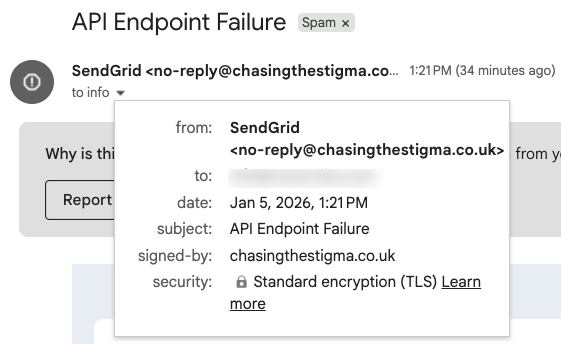
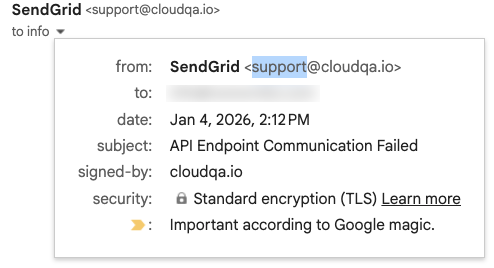
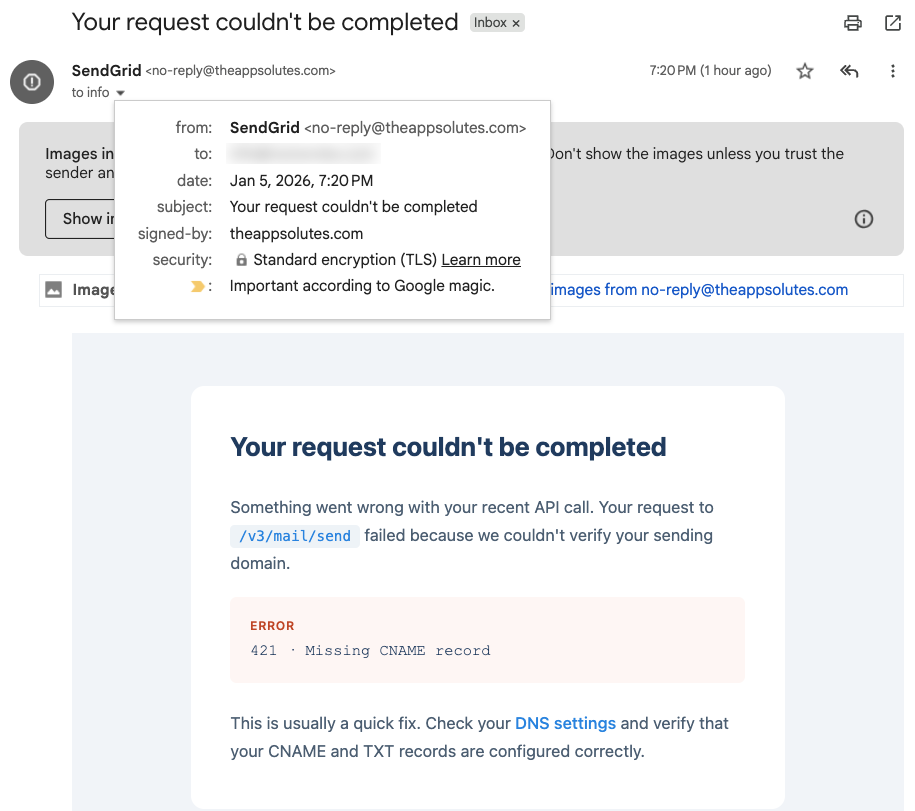
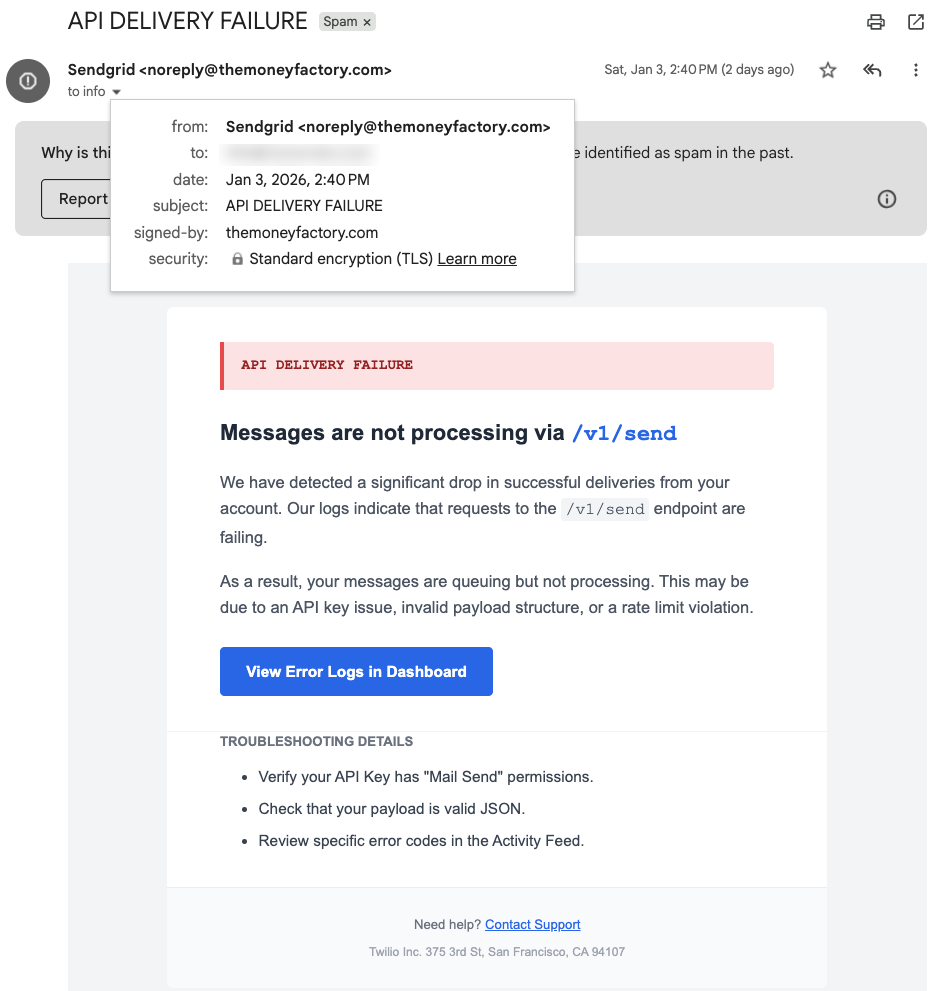
Over the past few days I started getting a bunch of weird error emails in my inbox from, what seemed to be, SendGrid. The subjects all looked technical; things like “API Endpoint Failure” or “messages are not processing via /v1/send”. Enough to make any developer raise an eyebrow 🤨

What’s going on is simple: some mail servers seem to have been compromised over the holidays and a bunch of not-so-nice people are sending phishing emails posing as SendGrid.

Now, if you’re not using SendGrid, you’d probably ignore them right away.

However, the goal is to get you to click a link that leads to a page that looks exactly like the real SendGrid login — and if you’re not careful, enter your real credentials (which they’ll happily store for future use 😅).

What makes this unusual is that Google hasn’t flagged these as spam yet, so be wary.

What You Should Do

  • Don’t click any links in the message.
  • Mark the message as spam or phishing in your email client.
  • If you do use the service, open your dashboard manually and check logs rather than clicking through the email.

Examples

Here are just some examples, so you can get an idea of what to look for. One common sign is that the email claims to be from SendGrid, but the domain in the “signed-by” field is something you’ve never heard of.


Conclusion

Remember, always, always, always check the actual From in an email if it looks remotely shady.

Stay safe!

Page 2 of 54«1234»102030...Last »

Recent posts

  • FOMO as a Developer: You’re Not Behind, You’re Just Human
  • If only life had an XP bar
  • Are Book Summaries Worth It?
  • Book review: 5 Love Languages
  • Why You Should Start Blogging (Even If Nobody Will Read It)

Categories

  • Android (3)
  • Books (115)
    • Programming (22)
  • CodeProject (36)
  • Daily Thoughts (78)
  • DevThink (8)
  • Go (3)
  • iOS (5)
  • JavaScript (128)
    • Angular (4)
    • Angular 2 (3)
    • Ionic (61)
    • Ionic2 (2)
    • Ionic3 (8)
    • MEAN (3)
    • NodeJS (27)
    • Phaser (1)
    • React (1)
    • Three.js (1)
    • Vue.js (3)
  • Leadership (1)
  • Meetups (8)
  • Miscellaneou$ (84)
    • Breaking News (8)
    • CodeSchool (2)
    • Hacker Games (3)
    • Pluralsight (7)
    • Projects (2)
    • Sublime Text (2)
  • PHP (6)
  • Quick tips (44)
  • Servers (8)
    • Heroku (1)
    • Linux (3)
  • Stack Overflow (82)
  • Unity3D (9)
  • VibeCoding (2)
  • Windows (8)
    • C# (2)
    • WPF (3)
  • Wordpress (2)

"There's no short-term solution for a long-term result." ~ Greg Plitt

"Everything around you that you call life was made up by people that were no smarter than you." ~ S. Jobs

"Hard work beats talent when talent doesn't work hard." ~ Tim Notke

© since 2016 - Nikola Brežnjak