
TL;DR
Why are we still using the QWERTY layout even if:
- it makes our fingers ‘walk’ way more miles for the same amount of written text (supposedly as much as 1 to 12-20)
- it makes us ~42% slower
- it causes all sorts of repetitive strain injuries
Sounds like I made this up. But here, look it up for yourself:
"Dvorak estimated that the fingers of an average typist in his day travelled between 12 and 20 miles on a qwerty keyboard; the same text on a Dvorak keyboard would require only about one mile of travel." ~ MIT
"Dvorak “uses about 63% of the finger motion required by QWERTY” (i.e., ~37% less motion)" ~ Wikipedia
The reason for this is simple: we’ve always done it that way™. We just don’t know that there’s something better out there. And by better, I mean miles better.
The second, more practical reason is that the change is hard. Like, really hard. Imagine having to re-learn how to ride a bike… Doesn’t sound too fun, now does it? 🤦
I went through this myself a couple of years ago, and once I went through the hard period (frankly, took me a month), I never looked back.
! TL;DR
In this episode of the DevThink podcast, Shawn and I nerd out about something you touch every single day (and probably never question): your keyboard layout.
Specifically, we talk about the Dvorak Simplified Keyboard layout — why it exists, what problem it tries to solve, and what it actually feels like to switch when you’ve spent your whole life on QWERTY.
Here are some main takeaways from our chat…
“Dvorak sounds scary” is… a branding problem 😅
Shawn makes a good point early on: the layout is often called “Dvorak,” but the original intent was a simplified keyboard layout optimized for English typing. The name makes it feel like some niche, academic thing you need a monocle to try.
The core idea: less finger travel, more alternation
Dvorak was designed around English letter frequency:
- Vowels on the left hand
- Common consonants on the right
- Lots of hand alternation, which can reduce strain
- More work done by stronger fingers (index/middle), less by pinkies
You can summarize it as: “move less, reach less, suffer less.”
The hardware rant: staggered keyboards are a fossil
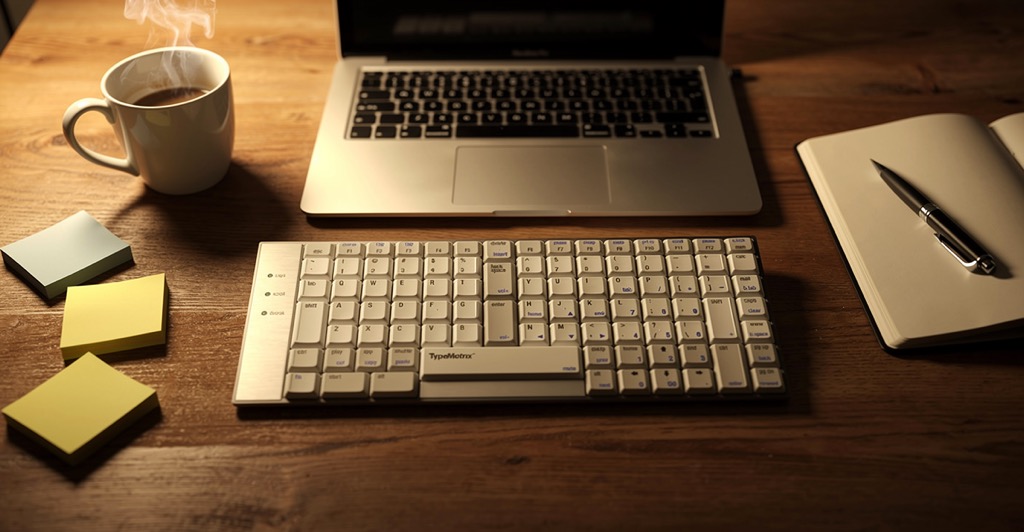
We also detour into a keyboard hardware topic I didn’t expect to love as much as I did: the TypeMatrix (http://www.typematrix.com/ – no affiliation) keyboard.
Shawn explains why most keyboards are staggered (mechanical typewriter constraints), and why that’s… kind of absurd in a world where the “bars that jam” problem no longer exists.
TypeMatrix goes with an ortholinear-ish grid, which makes touch typing feel more “logical” because you’re not constantly compensating for weird offsets.
My switch experience: the “first week pain” is real
I went into it thinking: “How hard can it be? I’m a touch typist.”
Well… cue dramatic music.
The first days were rough. The muscle memory you built over years doesn’t politely step aside. It fights back. Hard.
But after going cold turkey (no “just one quick QWERTY reply”), it started clicking:
- Touch typing felt more natural with Dvorak (especially on TypeMatrix)
- Speed improved week by week
- The mental “map” started forming again
The phone question: does QWERTY thumbs ruin Dvorak hands?
This comes up a lot, and we talk about it directly:
- Typing on a phone is a different motor skill (thumbs, not fingers)
- Keeping QWERTY on mobile won’t necessarily “undo” your Dvorak learning
- Shawn even mentions that he can’t type QWERTY on a computer anymore… but still uses QWERTY on his phone
So yeah—no need to panic and install 17 weird iOS keyboard apps unless you really want to.
If you’re considering switching, here are some practical takeaways
If you type mostly in English and spend a lot of time at the keyboard, experimenting with Dvorak is one of those rare “small change, big daily impact” things.
My personal advice (based on what I learned the hard way):
- Expect the first week to feel like typing with oven mitts
- If you can, do it during a slower period (vacation / lighter workload)
- Decide early: cold turkey or mixed mode
(mixed mode preserves QWERTY ability, but slows Dvorak mastery)
And voilà — your keyboard becomes a project. Because of course it does.
Transcript
Here’s the cleaned up transcript of my chat with Shawn (in case you wanna feed it into an LLM or something). If you want to listen to the recording, you can do so here (I suggest 1.5x speed as I speak too slow 🙂)
Shawn: Alright. Welcome back to the second DevThink podcast. This is Shawn Maločić, and with me is—
Nikola: Nikola Brežnjak.
Shawn: Today, we’re here to talk about the simplified keyboard layout, which is something that I’ve been using for about ten years. It’s more commonly known as the Dvorak layout because it was designed by a guy named August Dvorak and now bears his name—which I think is actually a big problem. The simplified keyboard layout is something a lot of people would be interested in learning, but “Dvorak” (d-v-o-r-a-k), syllables we don’t generally use in English, tends to make people think it’s something hard or scary.
I haven’t found it to be that, and I’ve found it to be very beneficial to my life. Nikola has been using it for, I guess, a few weeks now. Do you want to describe what it is, since you’re looking at it from a fresher perspective than I am?
Nikola: Yes. So basically, it’s a different layout. You can use the Dvorak layout on any keyboard. Of course, it would be kind of a pain if you were looking at the keyboard and it says “S” but it’s actually “O” if you switch. But then again, the advice you gave me was: do not look at the keyboard.
So yeah—basically, the letters are all mixed up based on this Dvorak guy. Actually, a side note: isn’t it actually pronounced “Dvorak”?
Shawn: It is. That’s actually probably the correct pronunciation. And I just want to mention: the layout was designed explicitly for the English language. So if you’re typing in English, this will be helpful.
The general idea is that the guy who invented it studied English words, phrases, sentences—whatever—and figured out how to minimize finger movement. So the keyboard is designed in such a way that if you were to type out an entire novel in both QWERTY (the standard English layout) and the simplified keyboard layout, your fingers would travel many, many miles less with Dvorak than with QWERTY.
Nikola: Yeah. I read somewhere that it’s actually 40% more finger movement on QWERTY than on Dvorak. And also all the vowels are on the left side of the keyboard. So in general, in English, you will alternate your hands when typing. There are almost no words you’ll ever type in English all with the same hand, which is nice because it reduces strain that way as well.
And then in addition: if you consider your ring finger and pinky finger to be weaker, and your index and middle finger to be stronger—the most frequently used keys you have to reach for or type are going to be with your index and middle finger. You do a lot less reaching. The less-used keys are the ones your pinky uses.
And then the home row—everyone knows “A S D F” … and “J K L ;”. Anyone who’s taken a class has done that. So compare “A S D F” with “A O E U”. That’s your home row with your left hand.
And the right hand—instead of “J K L ;”—is “S N T H”. I mean, are there any more commonly used letters in the English language than “S N T H”? And who uses semicolons except programmers on a regular basis?
Shawn: Yeah. So, anyways, as you said: “Nikola, try it.” I was like, “Okay,” because I’m going to do it. But then again, I remember one friend referring me to it before, and I looked at it and thought, “Are you crazy?”
But it was an awesome time to try it because we were on a break, so I was at home and I said: “I’m going to give it a go.”
Although—to be fair—I’m doing this on a keyboard you gave me, thank you very much. It’s actually a TypeMatrix keyboard.
So let’s put Dvorak aside: TypeMatrix… I love it. I honestly love it. And as you said, you could use QWERTY on it without a problem. I agree. People should look up that keyboard because I think it’s cool. Maybe you can say more about it, because you’ve been using it for how long again?
Shawn: I’ve been using it since February 2006. I will not use anything else.
Probably everyone listening to this has a keyboard based on a limitation of mechanical typewriters. Back in the day, every key you pressed raised a metal bar with a reversed letter that slammed into an ink ribbon and hit the paper. So if you look at your keyboard—just to pick two QWERTY characters at random—there’s “J” and “U”. J is on the home row, U is right above it.
If those metal bars were in direct line, you could never type J, because it would just slam into the U bar. So all the keys on your keyboard are staggered. Your top row isn’t perfectly aligned with your home row, which isn’t perfectly aligned with the bottom row.
We still—today—manufacture keyboards this way, which makes no sense. Not only do you have to learn which finger types which letter and whether it stays on the home row or reaches up and down—you also develop an instinct for whether you need to reach up and slightly left, or slightly right, or down and slightly left, or slightly right. There’s no sense in this.
So these people at TypeMatrix (typematrix.com)—I have no financial association with them—but I recommend everyone buys their keyboards because they are sane. They fixed this. I’ve been using it since February 2006 and I will never go back.
I’ve purchased extras and have them brand new in boxes in storage, just in case they become unavailable, because I don’t want to type on anything else.
Nikola: Awesome. Yeah.
What I noticed is that my fingers definitely don’t have to move as much. But also, I really see that in this setup, I don’t have to move my fingers much.
One thing: I’m in Croatia—born and raised, still living here—although I type mostly in English (like 99%), so that’s not an issue.
So how I started: I’ve been a touch typist—I can type very fast and I don’t need to look at the keyboard. On QWERTY I was very fast. That’s one thing. So I developed this muscle memory for certain keys—when you see the key in your mind before you even press it.
And now when I was trying Dvorak… oh dear God. First few days: a pain. Honestly, a pain.
To be fair: I had to reply to one ping on Slack very quickly, and I literally went on my laptop and typed the reply there. It felt… relieving.
But then I talked with you and you said: “Don’t do that, because you’re not progressing.” And I said: “Okay. If I’m going into this, I’m going cold turkey.”
And literally ever since then—so I’m on my third week now—I haven’t used anything else but this keyboard and the Dvorak layout. It’s gotten way better. Honestly, way better.
Here’s one thing: I think it’s way easier to do touch typing—using all of your fingers—with this layout, and especially with this keyboard.
Also: zero affiliation. You were the one who introduced me to it. So yes, I’m feeling there’s definitely something in it. I’m still not as fast as I was on QWERTY, but I’m sensing I’m developing new muscle memory for these keys.
One thing I brought up—and you said I shouldn’t worry—is that on my phone, I still have the QWERTY keyboard. And I felt that by using that, I’m going backwards, like not using Dvorak everywhere.
I installed some new keyboard on my iPhone, but I don’t like it because it’s not in the same row. But hey—I had a great app idea there. Maybe I’ll make it. We’ll see.
But as you said, I don’t have to worry about it, right?
Shawn: Right.
Here’s the thing. If you are in tech support, or if you work somewhere where you handle other people’s computers all day, or use other people’s terminals, you may have to type QWERTY.
You can always do a software change of the keyboard layout from QWERTY to Dvorak, and that’s fine. But if you feel it would be an undue burden to lose your QWERTY ability, then you have to continue to do QWERTY interspersed with Dvorak.
Because if you don’t, by the time you’ve learned Dvorak fluently, you will actually have lost your QWERTY.
I typed QWERTY for over a dozen years. When I switched, I went cold turkey, never looked back, and I completely lost my QWERTY.
However, on phones, they didn’t have a Dvorak layout, so I just continued typing with my thumbs on QWERTY.
A couple years ago, I found I could actually get a Dvorak layout on my phone, and I switched to it—and I was completely lost. I just went back to QWERTY on the phone.
When I type with my thumbs, I use QWERTY. If you put a gun to my head and made me type QWERTY on a computer keyboard, I would not be able to do it. But it’s the only thing I know how to type with my thumbs. So I don’t think it’s a detriment to continue thumb typing with whatever you want—or swipe typing, whatever.
Nikola: Awesome. Awesome.
Anyways, that’s it for now. We’re going to do a follow-up when I’m “converted,” so stay tuned for that episode.
And until then—try it. You’ll see. I definitely see the benefit.
If you asked me two weeks ago, I would tell you: “Okay, that’s kind of how I am. I will try it. I will give it a fair shot.” But at that time I was like: “This cannot work.”
Now I’m like: “Okay. This will definitely work. I love it. Just give me a bit more time.”
So yeah… try it. See if this is something you may benefit from.
Anyways, till next time.
Shawn: Yeah. Look it up. Do some research for yourself, and let us know what you think.
Nikola: Awesome. See you, guys.
Shawn: Alright. Bye.
Thank you for listening to the DevThink podcast. To reach us for feedback, show suggestions, or any other comments, email us at [email protected]. That’s devth.ink.